Best Agentic AI Code Reviewers for GitHub and GitLab in 2026

Many engineering organizations keep code on two platforms: product repositories on GitHub.com, and infrastructure or acquired code on GitLab Self-Managed. Both platforms now ship their own AI reviewer. Copilot code review handled more than one in five GitHub code reviews by March 2026, and GitLab’s Code Review Flow became generally available in GitLab 18.8. Each one reviews only the code on its own platform. This guide compares agentic code reviewers on what matters when your code lives on both.
TL;DR
- GitHub and GitLab now review code their own assistants write. On March 5, 2026, GitHub reported that Copilot code review handles more than one in five code reviews on GitHub, and Copilot also writes code. GitLab’s Duo Code Review Flow became generally available in GitLab 18.8, and GitLab’s Duo agents also write merge requests. When a platform’s own assistant wrote the change, the same vendor wrote and reviewed it, and the review covers only that platform.
- Qodo is the best agentic AI code reviewer for GitHub and GitLab. It is independent of every coding assistant, keeps one rulebook for pull requests and merge requests, and publishes its per-platform table: 37 of 45 review settings and commands match on both platforms.
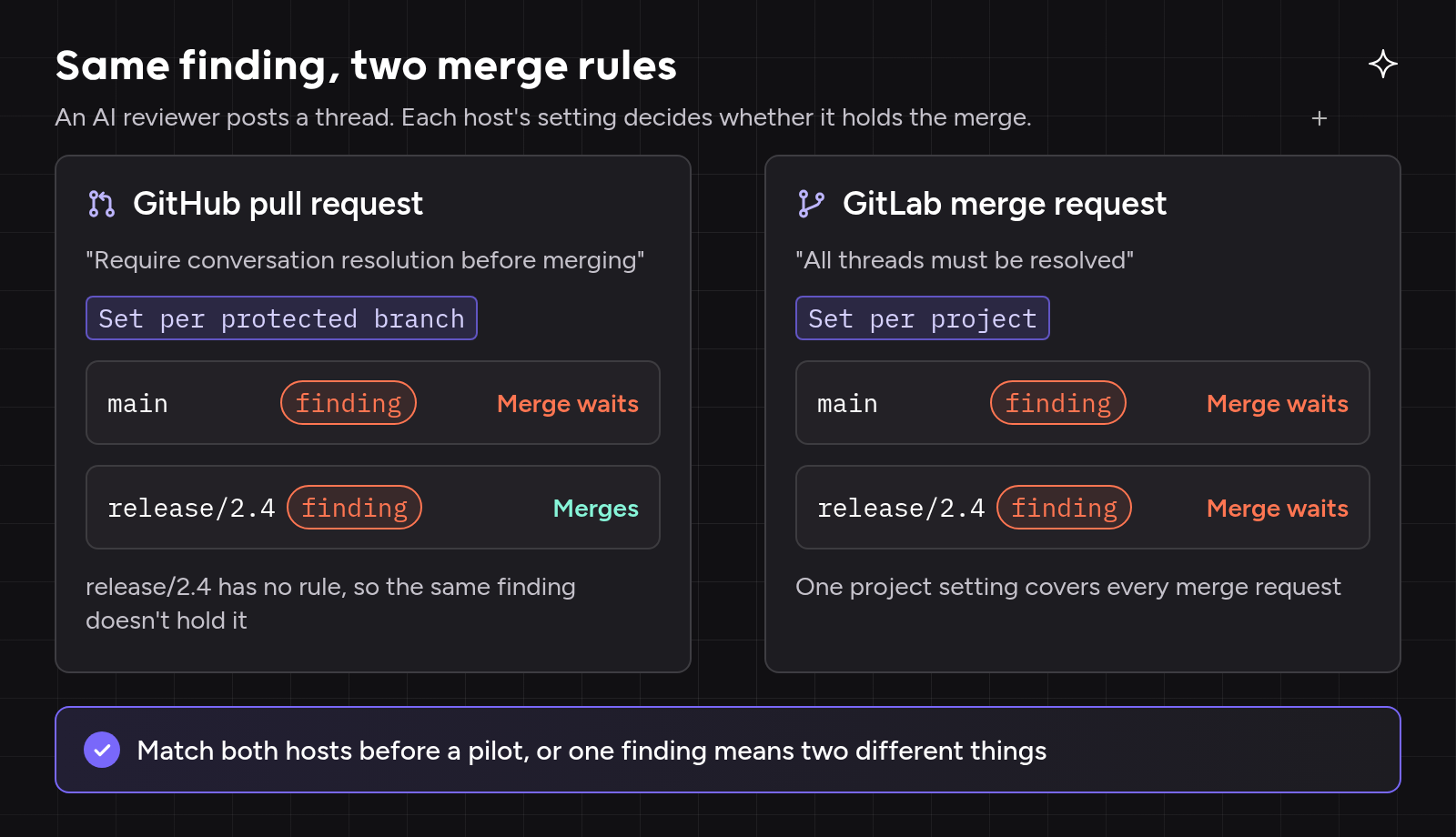
- The same finding can follow two merge rules. GitHub sets conversation resolution per protected branch or ruleset; GitLab sets thread resolution per project.
- Every other option has a gap between GitHub and GitLab. Linked repositories must be on the same platform, autofix and status checks are more limited on GitLab, or the reviewer covers only one of the two platforms.
- Check what works on both platforms, not just the “supports GitHub and GitLab” label. Six checks and a pilot plan are below.
What Is the Best Agentic AI Code Reviewer for GitHub and GitLab?
A reviewer for a company that uses both GitHub and GitLab has to meet five requirements. It must be independent of the assistant that wrote the change, because you can’t review code with the same tool that wrote it. It must behave the same on GitHub pull requests and GitLab merge requests, and say plainly where it doesn’t. It needs one rulebook for both platforms, context from repositories on either platform, and deployment wherever each platform runs, including GitLab Self-Managed and GitHub Enterprise Server.
Our choice is Qodo, because it is the only one of the six that meets all five. It is an independent review layer that reviews whatever any coding agent writes. Its documentation lists exactly which settings differ between GitHub and GitLab. One portal governs the rules for every GitHub organization and GitLab group. Cross-repository review connects a repository on one platform to a repository on the other (Beta). And it runs on GitLab Self-Managed in every deployment model, air-gapped included.
Agentic AI Code Reviewers for GitHub and GitLab at a Glance
Each row comes from the vendor’s own docs and pricing pages.
| Rank | Tool | Review approach | GitHub / GitLab coverage | What changes between GitHub and GitLab | Pricing model (Oct 2026) |
| 1 | Qodo | Independent review layer, separate from every coding assistant | Cloud and Enterprise Server / GitLab.com and Self-Managed, including air-gapped | Published: 37 of 45 identical; self-review and CI-failure feedback are GitHub-only. Cross-repo context covers both platforms (Beta) | Pro Team packs start at $30 a month for 2,500 pooled credits; Enterprise custom |
| 2 | CodeRabbit | Review bot configured by repository file, central repo or org settings | GitHub / GitLab.com and Self-Managed 16.x+ | Linked repositories must be on the same platform; outside Enterprise, private shared config must sit in the same organization; merge and merge-queue controls are GitHub-only | Per developer per month, with a per-developer hourly review allowance |
| 3 | Greptile | Review bot over indexed repositories | GitHub and GitLab.com; Enterprise Server and Self-Managed on Enterprise only | Context repositories must be on the same platform as the reviewed repository | $1 per credit |
| 4 | Cursor Bugbot | Reviewer from Cursor, whose agent also writes the code | GitHub incl. Enterprise Server / GitLab incl. self-hosted, enabled per repository | Autofix only commits to the existing branch; no documented status check on GitLab | Usage-based on a Cursor plan |
| 5 | GitLab Duo Code Review Flow | GitLab’s built-in reviewer, in the platform whose Duo agents also write merge requests | None / GitLab 18.8+ | Doesn’t review GitHub at all | 0.25 GitLab Credits per review |
| 6 | GitHub Copilot code review | Review inside the Copilot assistant that also writes the code | GitHub.com only / None | Doesn’t review GitLab or Enterprise Server | AI credits plus Actions minutes |
Claude Code Review isn’t ranked: its managed reviewer runs on GitHub, while on GitLab Anthropic documents a CI/CD job (beta) you build and run yourself, on your own API key and runners. It’s billed on token usage through usage credits, with no flat per-review price; cost scales with change size and review level, and the “After every push” trigger multiplies it by the number of pushes.
Same Finding, Two Merge Rules: GitHub Pull Requests vs GitLab Merge Requests
The same inline finding can stop a merge on one platform and not on the other, and no ranking page we read explains why.
Where the difference comes from
GitHub’s “Require conversation resolution before merging” is a branch protection setting, so it applies per protected branch. GitLab’s “All threads must be resolved” is a project-level merge check: once it’s on, no merge request in the project can merge until its open threads are resolved. A GitLab importer issue (#371110) notes that GitHub’s per-branch rule maps to a GitLab project setting that applies to all branches. The OpenSSF Source Code Management best practices recommend turning thread resolution on.
What it means for an AI reviewer
An advisory reviewer’s inline finding is a thread. Whether that thread stops a merge depends on each platform’s settings, not on the reviewer. Threads can also close on their own: GitLab can auto-resolve threads a push makes outdated, and since September 2026 Copilot code review resolves its own comments once a later commit addresses them. A “resolve all threads” rule can be met without a person reading anything.
Make GitHub and GitLab behave the same
Set both platforms to the same behavior before any pilot. The GitHub API call below replaces all of the branch’s existing protection settings, so teams that already protect the branch should use the Settings UI or rulesets instead.
# GitLab project: Settings > Merge requests > "All threads must be resolved"
PUT /projects/:id  only_allow_merge_if_all_discussions_are_resolved=true

# GitHub protected branch: "Require conversation resolution before merging"
PUT /repos/{owner}/{repo}/branches/main/protection  required_conversation_resolution=true
How We Evaluated: Six Checks for Teams on GitHub and GitLab
We read each vendor’s documentation and pricing, plus GitHub’s and GitLab’s docs, between October 20 and 22, 2026. Every check looks at what changes when a tool moves from one platform to the other, because that is where buyers find that features they expected are missing. Qodo Academy’s guide to Git provider integration makes the same point: what a tool supports depends on both the platform and how that platform is deployed, not on the platform alone.
| # | Check | What we looked for in the docs |
| G1 | Platform and edition coverage | Enterprise Server and Self-Managed support, version floors, plan required |
| G2 | What’s missing on the other platform | Published per-platform tables or notes in the vendor’s own docs |
| G3 | What a finding does at merge time | Inline threads, approvals or change requests, per platform |
| G4 | One rulebook across both platforms | One place for rules, or one file per platform |
| G5 | Setup permissions on each platform | App, token or service account; roles; runners |
| G6 | One bill or two | One subscription, or separate charges per platform or seat |
We also traced one scenario through each vendor’s docs. On Monday the platform team adds a rule: every new HTTP endpoint needs rate limiting. By Friday, a GitHub.com pull request and a GitLab Self-Managed merge request both add endpoints without it. Can one rule cover both, and how does the finding appear on each platform?
The 6 Best Agentic AI Code Reviewers for GitHub and GitLab
1. Qodo: One Review Setup for GitHub and GitLab, With the Differences Published
Review approach: an independent review layer. Review, rules and governance are Qodo’s whole product, and it sits outside every coding agent. One workspace covers GitHub, GitLab, Bitbucket and Azure DevOps, with Gerrit on Enterprise.
Differences between platforms, documented. Qodo publishes a feature table per Git provider. Of 45 review settings and commands, 37 match on GitHub and GitLab. The eight that differ are all GitHub-only: two self-review settings, five CI-failure feedback settings and the /checks command. /agentic_review, /agentic_describe, /ask on code lines and every ignore filter work identically on both.
One rulebook (G4). Rules live centrally in Qodo and apply to GitHub pull requests and GitLab merge requests alike, once Rule enforcement is on. Teams can import AGENTS.md and other agent rule files from either platform (Beta). When a merged file adds a rule, Qodo adds it; edits and deletions of existing rules are made in the Rules tab, not the file. Rule Miner (Beta) mines new rules from review history on GitHub, GitLab and Azure DevOps, on multi-tenant and single-tenant deployments.
Context from both platforms. Cross-repository review (Beta, multi-tenant and single-tenant) relates repositories Qodo discovers or your team defines, across Git providers. A GitHub pull request that changes an API contract a GitLab project consumes gets a cross-repo finding pointing at the affected GitLab code.
Merge time and setup (G3, G5). Findings are advisory by default: authors fix them or dismiss them with a recorded reason, and each platform’s merge settings decide what merges. On GitHub, you install the Qodo GitHub App. On GitLab, Qodo works through a service account with Developer permissions, created automatically from a group Owner’s token, which Qodo then discards. On GitLab Self-Managed, a GitLab administrator can create the service account instead.
Deployment and pricing (G1, G6). GitLab Self-Managed runs in all four deployment models, from multi-tenant to air-gapped. GitHub Enterprise Server is supported on single-tenant and on-prem deployments. One plan covers every platform: Pro Team credit packs start at $30 a month for 2,500 credits pooled across the team, with overage at the same per-credit rate and no limits on repositories or users. Enterprise is custom.
In production. TUI Group uses Qodo as the governance layer for AI-assisted development across its platforms. Christian Rudolph described the role in Qodo’s March 2026 announcement:
“As we expand the use of AI-assisted development across our platforms, Qodo ensures every line of code meets our standards for performance, security, and compliance. The layer of governance Qodo provides is critical to delivering seamless, reliable travel experiences at a global scale.”
Christian Rudolph, Head of Platform Services, TUI Group
2. CodeRabbit: Linked Repositories Must Be on the Same Platform
Review approach: an AI review bot installed per Git platform, configured through .coderabbit.yaml files, a central configuration repository or organization settings.
Where it falls short across GitHub and GitLab. Its docs state that all linked repositories “must be on the same platform as the pull request under review,” so a GitHub service can’t be reviewed against the GitLab library it calls. Outside Enterprise, shared configuration files have to belong to the same owner or organization as the reviewed repository, or sit at a public URL. A private shared configuration for both a GitHub organization and a GitLab group needs CodeRabbit’s Enterprise SSO workspace.
On GitLab, fewer controls. Its Change Stack view (Preview) calls GitHub “the most complete provider path”: direct merge and merge-queue controls exist only there. It supports GitLab 16.x and later, and warns that on 15.x review comments may not post. Self-hosting is limited to Enterprise customers with 500 or more seats.
Pricing: per developer per month, from $24 billed annually. Every plan carries a per-developer hourly review allowance, and its docs warn that reviewing every push can use the allowance quickly.
3. Greptile: Cross-Repo Context Limited to One Platform
Review approach: an AI review bot that indexes each connected repository.
Where it falls short across GitHub and GitLab. Greptile’s configuration reference says repositories added for context “must be on the same SCM host as the primary repository,” so a GitHub pull request can’t draw on a GitLab dependency through context.repos. GitHub Enterprise Server and GitLab Self-Managed require Greptile Enterprise, enabled through sales.
Pricing: $1 per credit, shared across the organization, with self-hosted Git on the Enterprise plan.
4. Cursor Bugbot: Cursor’s Reviewer, Fewer Controls on GitLab
Review approach: Cursor’s own reviewer, sold with the Cursor plans whose agents also write the code, so the reviewer and the author come from the same vendor.
Where it falls short across GitHub and GitLab. On GitLab, Bugbot is switched on repository by repository. Autofix can open a new branch on GitHub but only commits to the existing branch on GitLab, and skips stacked merge requests there. Cursor documents a status check that branch protection can require for GitHub, Bitbucket and Azure DevOps; GitLab isn’t on that list. Cursor’s docs also state that project rules in .cursor/rules/ don’t apply to Bugbot runs, so agent rules and review rules live in separate files.
Pricing: usage-based on a Cursor plan. Cursor put the average run at $1.00 to $1.50 (May 11, 2026), and Bugbot runs on every pull request update by default, so each push to an open PR can bill again unless “Run only once per PR” is set.
5. GitLab Duo Code Review Flow: GitLab’s Built-In Reviewer, GitLab Only
Review approach: the agentic reviewer in GitLab Duo Agent Platform, the same platform whose Developer Flow turns issues into merge requests.
Where it falls short across GitHub and GitLab. It doesn’t review GitHub pull requests, so a company that also uses GitHub still needs a second reviewer and a second rulebook. Each review runs as a CI/CD job on a runner tagged gitlab--duo or on GitLab-hosted runners, and it needs GitLab 18.8 or later. Its instructions live in mr-review-instructions.yaml, and GitLab’s docs say it doesn’t read AGENTS.md. A Duo approval (Beta, off by default) doesn’t count toward required approvals.
Pricing: 0.25 GitLab Credits per review, or $0.25 at the $1 list price, metered on every review. Qodo Academy’s GitLab tools chapter asks whether Duo is enough on its own and finds that its scope is limited to the single merge request.
6. GitHub Copilot Code Review: Copilot’s Reviewer, GitHub.com Only
Review approach: a capability of the Copilot assistant that also writes the code, so the same product drafts the change and comments on it.
Where it falls short across GitHub and GitLab. It doesn’t review GitLab merge requests, and Copilot code review isn’t available on GitHub Enterprise Server. Azure Repos support is a public preview. Context comes from the repository that owns the pull request plus any MCP servers you configure. Rules sit in repository instruction files and organization custom instructions, all on GitHub.com.
Pricing: AI credits plus GitHub Actions minutes, billed by default to each member’s entitlement.
What to Look For in an Agentic Reviewer for GitHub and GitLab
Map your repositories before you compare
List which repositories are on GitHub, which are on GitLab, and which shared libraries on one platform the other depends on. That list tells you whether a reviewer needs context from both platforms or can do without it. Ask where review runs on each platform: an app, a CI job on your runners, or a pipeline you own and pay compute for.
Signs a pilot on both platforms will mislead you
- The pilot runs only on GitHub, with GitLab “coming later.”
- Nobody on the GitLab side owns the pilot.
- Rules are written twice, once per platform.
Then ask: who owns the GitLab token or service account when the admin who created it leaves? Can findings sit next to your existing pipeline checks on both platforms? Does one rule change reach both platforms, or do you edit two files?
Qodo Academy’s guide to running a review POC lays out a three-week structure that fits a trial on both platforms. Put your hardest repository in it, such as a GitLab Self-Managed project behind a firewall with your oldest runners.
Walkthrough: One Qodo Setup Across a GitHub Org and a GitLab Group
These steps follow Qodo’s docs for the rate-limiting scenario above.
- Connect GitHub. Install the Qodo GitHub App on the organization and choose repositories.
- Connect GitLab. Follow the GitLab install guide: Qodo creates a service account with Developer permissions from a group Owner’s token; on GitLab Self-Managed, an administrator can create it manually. Repository sync, PR indexing and cross-repo discovery then run in the background.
- Write the rule once. Add “every new HTTP endpoint needs rate limiting” in the Rules tab. Once Rule enforcement is on, it applies to GitHub PRs and GitLab MRs alike.
- Match the merge settings. Set thread resolution the same way on both platforms, as shown earlier.
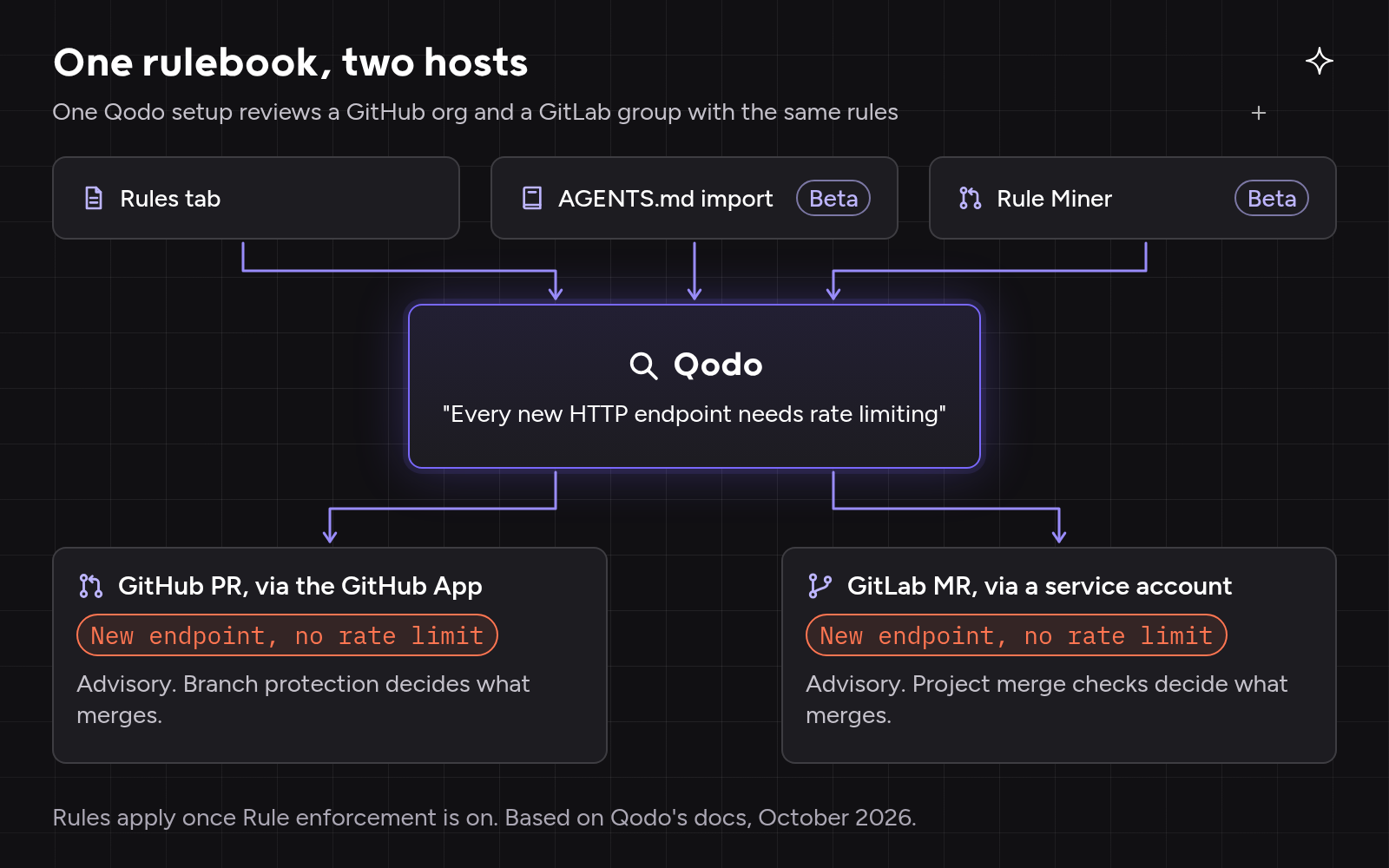
On Friday, both get the same finding, citing the same rule. Whether it stops either merge depends only on the merge settings you matched in step four.
Conclusion
By 2026, GitHub and GitLab each have their own reviewer, which reviews what that platform’s agents write, on that platform only. The review bots cover both platforms, but each limits context to repositories on one of them. Qodo is built for companies that use both: one independent review across GitHub and GitLab, one rulebook, context from repositories on either platform, and a published list of the few settings that differ. Of the six, it is the only one whose context and rulebook cover both platforms.
FAQs
Does AI code review work on GitLab Self-Managed?
Yes, but coverage varies. Qodo’s deployment table lists GitLab Self-Managed in multi-tenant, single-tenant, on-prem and air-gapped deployments. Greptile requires its Enterprise plan, CodeRabbit supports GitLab 16.x and later, and GitLab Duo Code Review Flow needs GitLab 18.8 or later and a runner.
What permissions does an AI code reviewer need on GitLab?
Usually Developer access to post merge request comments. Qodo uses a dedicated service account with Developer permissions. Automatic setup needs a group Owner; on GitLab Self-Managed, an administrator can create the account manually.
Does GitHub Copilot code review work on GitLab merge requests?
No. Copilot code review covers GitHub.com, with an Azure Repos preview. GitLab’s own option, Duo Code Review Flow, doesn’t review GitHub, so a company that relies on built-in reviewers for both platforms needs two.
Should we build our own GitLab review bot?
Some teams do. A home-built bot has to handle both platforms’ APIs, token ownership, rule upkeep and merge settings.
Ethical use of AI
We use AI to proofread and organise our ideas. The substance comes from our team of developers and technical experts: every fact is traced back to its original source, and every example is hand-crafted and tested.
About the author