Best AI Code Review Tools for GitHub Monorepos in 2026

In a GitHub monorepo, every team’s pull requests (PRs) land in one review queue, and an AI reviewer has to know whose rules apply in each folder. I compared five AI code review tools on five tests a monorepo reviewer can fail, including folder-scoped rules and who can change those rules.
TL;DR
- In a monorepo, every team’s pull requests land in one review queue. A reviewer needs rules per folder, control over which folders it reviews and a view of the callers a shared-package change can break, or it either misses team conventions or buries the findings that matter.
- Most AI reviewers come from the same tools that write the code. GitHub Copilot code review, Cursor Bugbot and Claude Code Review review code from their own coding assistants, and Graphite is built around stacked PRs.
- Qodo keeps your shared standards intact while every team writes its own rules. Qodo reads the rule files your teams already keep and applies each one only to its own folder. Once Rule enforcement is on, a team’s rules add to the shared baseline and never replace it, so no PR can quietly loosen the standards it’s reviewed against.
- Start small and widen as it proves itself. Scope review to one or two team folders, import each team’s AGENTS.md rules, then roll it out to the rest of the repo.
What Are the Best AI Code Review Tools for GitHub Monorepos?
The best AI code review tools for GitHub monorepos apply each team’s rules in its own folder, keep the shared standard in force everywhere and see past the diff. Every reviewer I read handles a single folder well, so the tests focus on the seams between folders, teams and rule files.
Five Tests a Monorepo Code Reviewer Can Fail
- Flags callers outside the folder that changed. A change to a shared package is checked against its callers in other team folders, so a signature change in
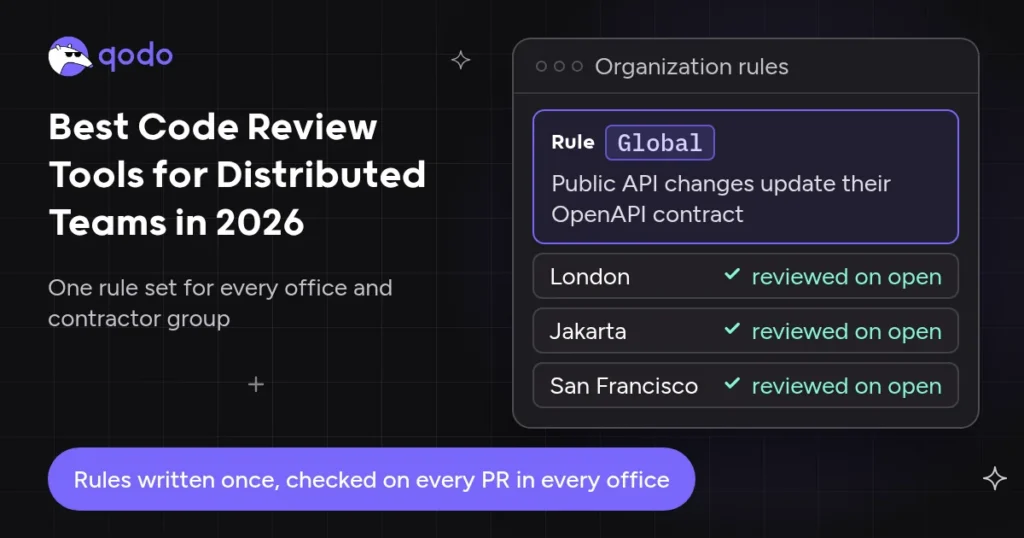
packages/shared/surfaces the app that still calls the old version. A reviewer that reads only the changed lines fails. - Scopes each team’s rule files to its folder, on top of shared rules. The reviewer applies the rule files teams already keep, such as AGENTS.md, only in the folder that holds them, and each team rule runs alongside the organization-wide rule above it. One flat rule list, rules in a central folder away from the code or a child folder that can switch off a shared rule fails.
- Controls who can change the review rules. A PR that edits a rule file is reviewed against the rules in force, and rule changes need an approval leaders can see. Reading rules from the PR’s own branch fails.
- Limits scope, noise and cost on very large PRs. Review runs only on chosen folders, generated code stays out and spend has a cap. A hard file ceiling or an uncapped bill fails.
- Reviews independently of the coding agent. You can’t review code with the same tool that wrote it, so a reviewer built into the coding assistant fails.
Qodo Holds Every Team Folder to One Shared Standard
Qodo is my #1 because it scopes each team’s rule files to that team’s folder, adds them to the organization’s rules and never lets a PR rewrite the rules it’s reviewed against, from outside every coding agent. Through Qodo 3.0, leaders see every rule with its folder scope, approve rule changes and trace findings by repository and PR author.
The 5 Best AI Code Review Tools for GitHub Monorepos
Ranking by Folder Rules, Rule Ownership and Context
- Qodo: independent review layer with folder-scoped rules and governance
- GitHub Copilot code review: reviewer built into a coding assistant
- Cursor Bugbot: reviewer built into a coding assistant
- Claude Code Review: reviewer built into a coding assistant
- Graphite: stacked-PR workflow tool with AI reviews
Comparison Table: AI Code Review Tools for GitHub Monorepos
| Tool | Best for | Per-folder rules | Pricing model (Oct 2026) |
| Qodo | Engineering orgs and leaders who need one set of rules enforced and visible across every team folder | Yes (Beta): rules scoped to the folder of each AGENTS.md, plus path patterns |
Credit-based: from $30/month for 2,500 credits pooled across the team; Enterprise custom |
| GitHub Copilot code review | Developers who want quick review feedback on GitHub PRs while coding | Yes: .instructions.md files with applyTo globs |
Included in Copilot plans, plus AI credits |
| Cursor Bugbot | Developers who want a fast bug check on PRs from the editor | Yes: nested .cursor/BUGBOT.md files |
Usage-based on Cursor plans |
| Claude Code Review | Teams who want one review file applied to every change in a repo | Repository-level REVIEW.md and CLAUDE.md | Usage credits on top of the plan |
| Graphite | Teams who split large changes into small, stacked PRs | Custom rules and exclusions | Per user; Enterprise custom |
Why AI Code Review Gets Harder in a GitHub Monorepo
A GitHub monorepo puts many teams, languages and release cycles behind one queue of pull requests, and monorepo code review breaks in three places first. Payments bans floats for money, and the UI package bans imports from A dependency bump or a generated-code refresh touches hundreds of files, and comments on all of them bury the one finding that matters. A change to
One rulebook doesn’t fit every folder
services/*. A reviewer with one flat rule list misses those rules or applies them in the wrong folder.Review scope gets noisy
Impact crosses package lines
packages/shared can break three apps, yet teams test it in the area it was written for. Qodo’s explainer on full codebase context shows why diff-only review misses the break.
Review is where monorepos slow down. Across 320 teams, the median PR cycle time was 19 hours in monorepos against 2 hours in polyrepos, a gap Faros ties to tooling and ownership models that haven’t kept pace (March 3, 2026, Faros PR benchmark).
Itamar Friedman, Co-founder and CEO of Qodo, put the problem this way in Qodo’s explainer on deep context search:
“In code review, context is everything: making sure you’re not duplicating code, that you follow the company architecture, that you’re not introducing breaking changes from another repo. Solving context is the hard part, and if we truly solved context, we’d pretty much solve software development.”
Itamar Friedman
How I Evaluated AI Code Review Tools for Monorepos
I built the tests from questions platform leads bring to Qodo about shared repositories. I read every vendor’s monorepo docs, configuration references, pricing pages and changelogs in October 2026 and traced one PR through each tool’s documented behavior: it changes a shared package, touches two team folders and edits a rule file.
Five Tests, Tool by Tool
| Tool | Callers outside the changed folder | Folder rules on top of shared rules | Who changes rules | Large PRs | Independent |
| Qodo | Context Engine, Breaking Changes Agent | AGENTS.md and similar files at any depth, all matching rules run | New rules on merge; edits on the Rules page; Pending rules | Folder filter, ignore settings, spending cap | Yes |
| GitHub Copilot code review | Repo, via Actions runners | applyTo globs in one folder; merging not documented |
Head branch | No published ceiling | Same assistant that writes code |
| Cursor Bugbot | Diff plus earlier PR comments | Nested BUGBOT.md; root plus parent files merge |
Settings from the base branch | Skips PRs over 100,000 changed lines | Same product as Cursor’s agent |
| Claude Code Review | Surrounding code in the repo | One REVIEW.md per repo | Base branch | Per-repo trigger; spend cap | Same vendor as Claude Code |
| Graphite | Repo | Custom rules and exclusions | Not documented | Stacked PRs | Part of Cursor |
My Experience Mapping the Rule Files Behind One Monorepo PR
I mapped which files each tool reads for one PR that edits packages/shared/money.ts, touches two team folders and changes a rule file, using each vendor’s configuration references and changelogs.
Where the rules sit. Copilot code review wants every path-specific file in one central .github/instructions/ folder with applyTo globs, Bugbot reads nested BUGBOT.md files in its own format, and Claude Code Review reads one REVIEW.md per repository. Qodo takes each team’s existing AGENTS.md and scopes it to its own folder, at any depth.
Which branch the rules come from. Copilot reads its instructions from the PR’s head branch, while Bugbot reads bugbot.yaml and Claude Code Review reads REVIEW.md from the base branch, so the same rule edit behaves differently in each tool. In Qodo, a merged rule file only adds rules, and admins edit or delete them on the Rules page.
Who sees the shared-package change. The packages/shared/ edit was the hardest line to trace in the docs. Qodo names a Breaking Changes Agent that checks upstream and downstream consumers, and the Codebase Wisdom skill answers “What would break if I changed this interface?” before the coding agent writes a line.
The detail I didn’t expect. Cursor project rules in .cursor/rules/ don’t apply to Bugbot runs, so a Cursor team keeps its rules in two places. Qodo imports .cursor/rules/ alongside AGENTS.md, CLAUDE.md and copilot-instructions.md, so one file serves the coding agent and the reviewer.
The Best AI Code Review Tools for GitHub Monorepos, Reviewed
1. Qodo Keeps Shared Standards Intact in Every Team Folder
Tool overview
Qodo is the quality and governance layer for teams shipping code with agents. Specialized agents review every PR for bugs, standards, architecture and risk, and a judge agent filters findings by confidence. Qodo checks every PR the same way, whether Copilot, Cursor, Claude Code or Codex wrote it.
Main features
- Rules that follow folders. Imported rules are automatically scoped to the folder containing the source file, at any depth (review standards docs). Rules from
services/payments/AGENTS.mdapply only underservices/payments/. Qodo reads AGENTS.md, CLAUDE.md, GEMINI.md, copilot-instructions.md and.cursor/rules/. - One rule across several folders (Beta). Portal rules take optional path patterns, so a checkout rule covers the web app, API and shared package without copies.
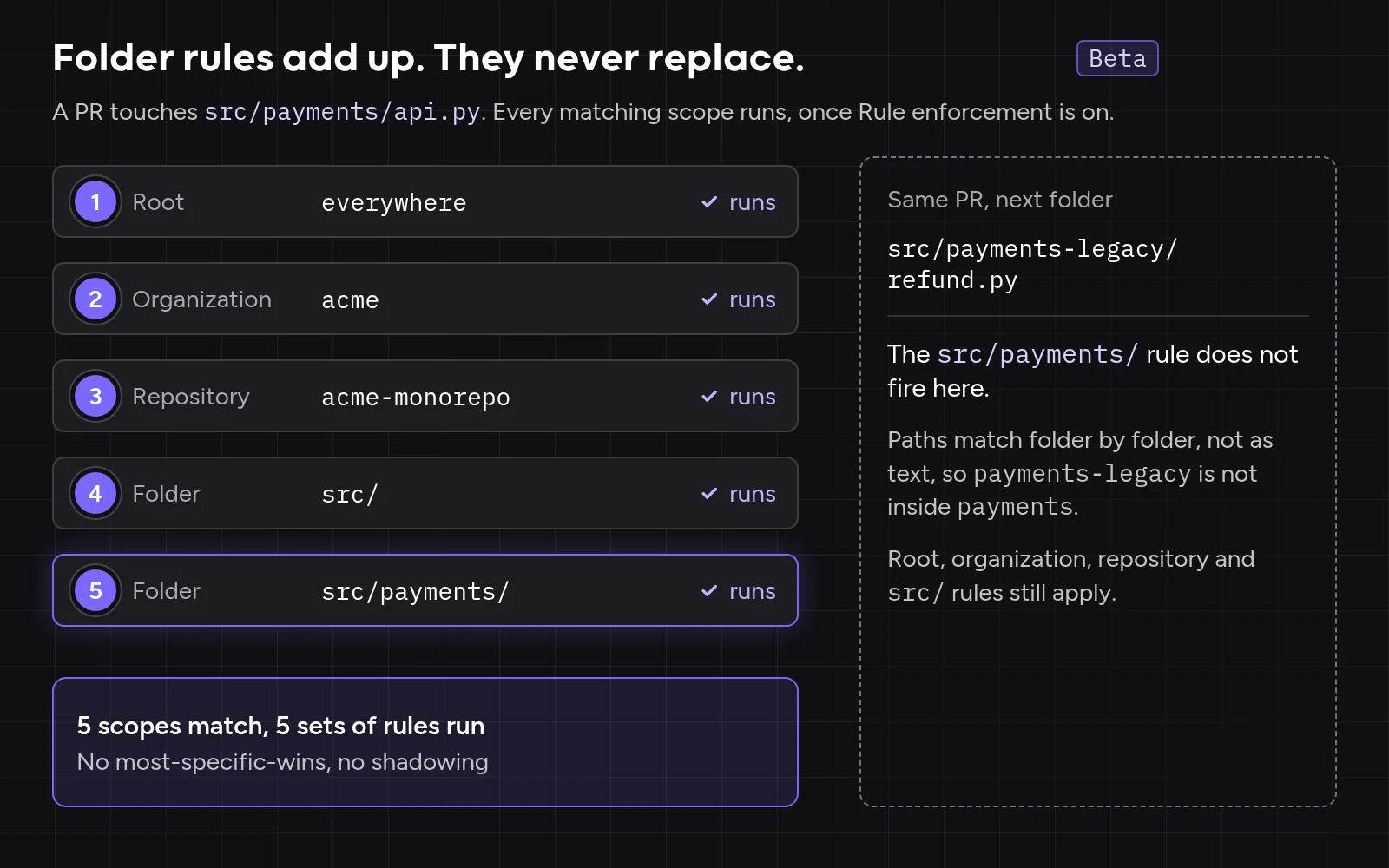
- Folder rules add to wider rules. When several rules match a change, all of them run. In Qodo’s Rules Lifecycle post (September 1, 2026), “a rule scoped to src/payments/ does not replace the organization-wide rule above it, it adds to it.” Paths match folder by folder, so a
src/payments/rule never fires onsrc/payments-legacy/. - Rule changes go through admins. A merged rule file adds new rules, while edits and deletions of existing rules happen on the Rules page. Rules that members suggest wait in Pending rules for admin approval by default, and the Rules page shows every rule with its scope.
- Rules mined from your PR history (Beta). Rule Miner turns accepted review comments into “area-specific rules, scoped to the paths they govern,” weighting each reviewer by ownership of the changed code.
- Callers outside the changed folder. Qodo’s Context Engine indexes the codebase to detect cross-module issues, and the Breaking Changes Agent identifies whether a change breaks upstream or downstream consumers (platform architecture docs).
- Quiet large PRs. The
allow_only_specific_foldersfolder filter runs automatic review only on PRs touching listed paths, ignore settings skip generated files, and each action level (Action Required, Review Recommended, Informational) routes inline, to the summary or nowhere. - Merge workflow. Authors fix findings or dismiss them with a recorded reason, and branch protection decides what merges.
- Pricing as of October 2026. Qodo’s pricing runs on credits pooled across the team, not seats, with a monthly spending cap. The Pro Team plan starts at $30 a month with 2,500 credits, and a large monorepo PR uses more credits than a small one, so pilot on your ten largest PRs first.

Best for
Engineering orgs and leaders who need one set of rules enforced and visible across every team and folder of a GitHub monorepo, with each team’s conventions applied in its own folder.
How it ranked
Qodo passes every test, and the cross-package test decided the ranking: a signature change in packages/shared/ is checked against its consumers, while folder rules, admin-held rule changes and review independent of every coding agent cover the rest. An AGENTS.md in a new folder joins at the next import.
2. GitHub Copilot Code Review
Tool overview
Copilot code review is the review feature of GitHub Copilot, the assistant that may have written the change.
Main features
- Path-specific
NAME.instructions.mdfiles whoseapplyTofrontmatter uses globs, such asapps/web/**/*.tsx, all kept in.github/instructions/. - AGENTS.md read from the repository root only.
- No published file ceiling since GitHub removed the size limit on August 27, 2026.
- Pricing as of October 2026: Included with Copilot Pro, Pro+, Max, Business ($19 per seat) and Enterprise ($39 per seat), with reviews drawing on AI credits and Actions minutes.
Best for
Developers who want quick review feedback on GitHub PRs while coding.
How it ranked
Copilot scopes rules by glob, but every team edits one central folder. Instructions come from the PR’s head branch, so a PR can change its own rules.
3. Cursor Bugbot
Tool overview
Bugbot is Cursor’s PR reviewer, from the editor and agent that may have written the change.
Main features
- Nested
.cursor/BUGBOT.mdfiles: the root file plus everyBUGBOT.mdabove the changed files, with team rules on top. bugbot.yamlsettings read from the base branch; Cursor project rules in.cursor/rules/don’t apply to Bugbot runs.- A neutral check by default; PRs over 100,000 changed lines are skipped.
- Pricing as of October 2026: Usage-based on Cursor plans; Teams plans start at $30 per user per month.
Best for
Developers who want a fast bug check on PRs from the editor.
How it ranked
Bugbot scopes rules by folder in its own format, apart from the files teams already keep. Combined rules are capped at 100,000 characters, the first number I’d check in a monorepo with a rule file in every team folder.
4. Claude Code Review
Tool overview
Claude Code Review is Anthropic’s managed PR reviewer, from the same company whose Claude Code may have written the change.
Main features
- Several agents review the change and surrounding code, and a verification step checks findings.
- REVIEW.md is read from the base branch, never from the PR’s own changes.
- A review never approves or blocks the PR; GitHub only.
- Pricing as of October 2026: Token-based usage credits on top of the plan, with an org-level spend cap.
Best for
Teams who want one review file applied to every change in a repo.
How it ranked
Claude Code Review passes the rule-change test, since a PR can’t rewrite REVIEW.md. Every team shares one review file per repository.
5. Graphite
Tool overview
Graphite combines stacked PRs, a merge queue and Graphite Agent reviews. Graphite has been part of Cursor since December 2025.
Main features
- Stacked PRs split a large monorepo change into small, dependent PRs that any reviewer can read in one sitting.
- Graphite Agent reviews with custom rules and exclusions; merge queue on Team and above.
- Pricing as of October 2026: Starter $20 and Team $40 per user per month billed annually; Enterprise custom.
Best for
Teams who split large changes into small, stacked PRs.
How it ranked
Graphite answers the large-PR test by keeping each change small. Graphite Agent rules aren’t per-folder files, and the value depends on the team adopting stacking.
Hands-On: Scope Qodo Review to Three Teams in One GitHub Monorepo
Here’s how I’d configure three teams in one repo.
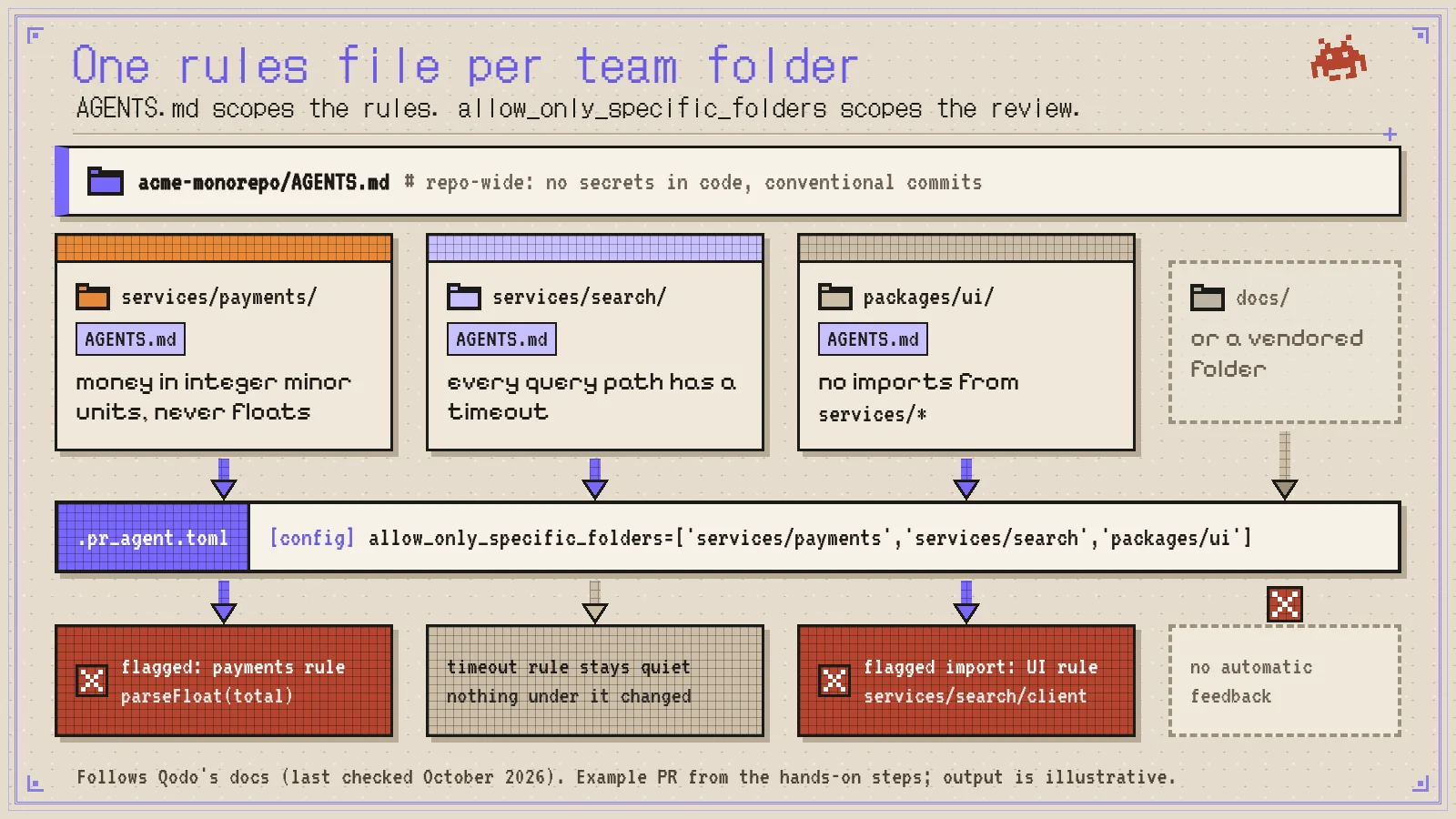
Step 1: Put each team’s rules next to its code.
acme-monorepo/
|-- AGENTS.md # repo-wide: no secrets in code, conventional commits
|-- services/payments/AGENTS.md # money in integer minor units, never floats
|-- services/search/AGENTS.md # every query path has a timeout
|-- packages/shared/AGENTS.md # exported functions keep their signatures, or the PR updates every caller
|-- apps/billing/ # calls formatAmount() from packages/shared
`-- packages/ui/AGENTS.md # no imports from services/*
Step 2: Import rules and skills. In the Qodo portal, click Import rules and skills and select the repository. Each rule shows its scope on the Rules page, for example services/payments/. For a feature area across several folders, add a path pattern per folder to one rule.
Step 3: Run automatic review only for PRs that touch the pilot folders. In .pr_agent.toml at the repo root:
[config]
allow_only_specific_folders=['services/payments','services/search','packages/ui']
A PR touching only docs/ gets no automatic feedback. The trigger matches paths as text, so services/payments-legacy/ triggers a review too, while rules still match folder by folder.
Step 4: Open a PR that crosses two folders. A developer adds parseFloat(total) in services/payments/refund.ts and imports services/search/client from packages/ui/SearchBox.tsx. Qodo flags the float under the payments rule and the import under the UI rule, and the root rules check every file.
Step 5: Test a rule edit. Delete a rule from services/payments/AGENTS.md in the same PR. Once Rule enforcement is on, the deletion isn’t reflected, and the rule stays active until an admin changes it on the Rules page.
Step 6: Ask authors to confirm findings. Add demand_self_review = true under [review_agent] so a checkbox appears under the findings, then comment /agentic_review to rerun after a fix.
Step 7: Change a shared signature and check the callers. Add 'packages/shared' to allow_only_specific_folders first. Before editing, the developer’s coding agent asks Qodo’s Codebase Wisdom skill, “What would break if I changed this interface?”, and gets the callers of formatAmount() in apps/billing/ and apps/web/. The PR then adds a required currency argument in packages/shared/money.ts but updates only apps/web/.
Qodo’s Breaking Changes Agent checks whether a change breaks downstream consumers, so the untouched apps/billing/ caller is the finding to expect, alongside the packages/shared/AGENTS.md rule. To label risky shared-package PRs, turn on blast radius (Research Preview) under Configurations > Workflow > Code review, or in .pr_agent.toml:
[review_agent]
publish_blast_radius_labels = true
Each PR then carries one Large, Medium or Small blast radius label reflecting the highest risk in its review cycle, so a platform reviewer takes every Large PR under packages/shared/ (blast radius docs).
GitHub CODEOWNERS and AI Code Review: Who Owns the Rules
GitHub CODEOWNERS decides which humans must approve a change, and no AI reviewer in this ranking documents reading the CODEOWNERS file to scope rules. The safest pattern works with any reviewer: put each AGENTS.md under its folder’s owners and give the root rules to the platform team.
# .github/CODEOWNERS
/AGENTS.md                      @acme/platform
/services/payments/             @acme/payments
/services/payments/AGENTS.md    @acme/payments @acme/platform
/packages/ui/                   @acme/frontend
Turn on Require review from Code Owners so the owners’ sign-off is the minimum bar. As Qodo’s CODEOWNERS explainer puts it, “CODEOWNERS decides who reviews the files; Rules helps verify what that review should protect.”
How to Choose and Roll Out an AI Code Review Tool for a GitHub Monorepo
Three Steps to Pilot and Widen AI Review
- Write the folder policy and name the rule owners. List which teams own which folders and which rules apply everywhere, import each team’s existing AGENTS.md files, and let one platform team approve shared rules while folder owners approve their own.
- Pilot on your 10 largest recent PRs and price a heavy month. Replay dependency bumps and cross-package refactors, count findings developers fixed, ask how cost grows with PR size and rule count, and cap spend before the pilot.
- Widen folder by folder. Add one team at a time and re-import rules as new AGENTS.md files land.
Red Flags in a Monorepo Reviewer
- A child folder can switch off a shared rule.
- Rules come from the PR’s own branch.
- A hard file ceiling sits below your largest refactors. Some AI reviewers cap one review at 150 or 300 files depending on the plan and skip larger PRs, so check the cap against your biggest refactors.
Summary: Qodo Keeps One Standard Across Every Team Folder
For a GitHub monorepo shared by several teams, I’d start with Qodo. Qodo scopes each team’s AGENTS.md to its folder, adds those rules to the organization’s rules, keeps rule changes with admins and checks shared-package changes against their callers. The org-wide standards enforcement explainer covers the wider governance picture, and our guide to how context engines work explains how AI coding agents get codebase context. Teams that also run GitLab can compare agentic AI code reviewers for GitHub and GitLab.
FAQ: AI Code Review in GitHub Monorepos
What are the best AI code review tools for GitHub monorepos?
The best AI code review tools for GitHub monorepos scope each team’s rules to its folder, keep shared rules in force and check shared-package changes against their callers. Qodo ranks first because it imports AGENTS.md rules per folder, adds them to organization rules and checks downstream consumers of every change.
Can AI code review apply different rules to different folders in a monorepo?
AI code review can apply different rules per folder when the tool scopes rules by path. Qodo scopes each imported AGENTS.md to its folder at any depth, on top of org-wide rules.
Can a team’s folder rules override org-wide rules?
Whether a team’s folder rules can override org-wide rules depends on the reviewer, and some let a child folder disable an inherited rule. In Qodo, all matching rules run, and “a rule scoped to src/payments/ does not replace the organization-wide rule above it, it adds to it” (Rules Lifecycle post, September 1, 2026).
How do AI code reviewers handle generated code and very large pull requests?
AI code reviewers handle generated code and very large pull requests through folder filters, ignore patterns and size limits. Qodo reviews PRs touching listed folders, ignores files by pattern and routes low-priority findings to the summary.
Does AI code review work with GitHub CODEOWNERS?
AI code review works alongside GitHub CODEOWNERS, which decides who approves while the reviewer checks what the change should protect. Qodo’s findings are advisory, so code-owner approval stays the merge gate.
Can AI code review catch breaking changes across packages in a monorepo?
AI code review catches breaking changes across packages when the reviewer checks a shared package’s callers in other folders, not just the changed lines. Qodo’s Breaking Changes Agent identifies whether a change breaks upstream or downstream consumers, and blast radius labels mark the riskiest shared-package PRs for a platform reviewer.
What are the best AI code review tools for multi-language repositories?
The best AI code review tools for multi-language repositories let each language’s folder carry its own scoped rule file. Qodo scopes imported rules folder by folder, so a Go service and a TypeScript package each follow their own conventions.
Ethical use of AI
We use AI to proofread and organise our ideas. The substance comes from our team of developers and technical experts: every fact is traced back to its original source, and every example is hand-crafted and tested.
About the author