AI Code Review Buyer’s Guide: 9 Questions to Ask Before You Shortlist a Tool

The AI code review tool you choose decides how much agent-written code your team can merge safely, so the questions asked before a shortlist matter more than the demo. The guide gives engineering leaders 9 questions for every vendor, what each question tests and a one-day check.
TL;DR
- Review is where agent output piles up. Review and validation was the top bottleneck for 26% of engineering leaders, and only 3.7% said existing processes were sufficient, according to the Qodo State of AI Code Quality 2026.
- Ask about context and standards before features. The tools that fall short usually fail on what they read beyond the diff and on whether one rule list holds across every repository and coding agent.
- Settle deployment with InfoSec before the shortlist. Where code goes, which models read it and which certifications apply decide whether a pilot can ever reach production.
- Qodo checks every PR against the same rule list coding agents read before they write, with context across GitHub, GitLab, Bitbucket and Azure DevOps, plus Gerrit on Enterprise plans, so enterprise teams get one standard across many repositories and agent code merges sooner with fewer rollbacks.
How to Choose an AI Code Review Tool: 9 Questions
To choose an AI code review tool, ask each vendor 9 questions and drop any tool that cannot show its answer on your own repositories. I ordered the questions from the hardest to fix after purchase to the easiest:
- Is the reviewer separate from the tool that writes the code?
- What does the review read beyond the diff?
- Does one rule list guide the coding agent and the review?
- Does the tool learn from what your reviewers fix and dismiss?
- Can review run before a pull request exists?
- How does the tool keep findings few enough to act on?
- Does the tool cover every Git provider and coding agent you use?
- Where does your code go, and which models read it?
- What evidence will leaders see after 30 days?
Qodo is the best choice for engineering leaders shortlisting an AI code review platform for many repositories and coding agents because Qodo enforces one rule list on every PR, hands the same rules to the agent before it writes and reads cross-repo context across GitHub, GitLab, Bitbucket and Azure DevOps. Leaders see per-rule results for every repository after the first month.
Both audiences get agent code merged sooner with fewer rollbacks. Enterprise engineering teams get one rule list across many repositories and coding agents, with deployment InfoSec can approve. High-velocity teams get the rule files they already keep, such as AGENTS.md, CLAUDE.md and .cursorrules, checked on every PR, with setup taking about 5-10 minutes for cloud Git providers and no new process.
The 9 Questions for AI Code Review Vendors, With a One-Day Check
1. Is the reviewer separate from the tool that writes the code?
You can’t review code with the same tool that wrote it, because a reviewer built into the coding tool shares its blind spots. Ask whether the review runs as its own system and treats every coding agent’s output the same way.
One-day check: open PRs written by two different coding agents and compare the findings.
2. What does the review read beyond the diff?
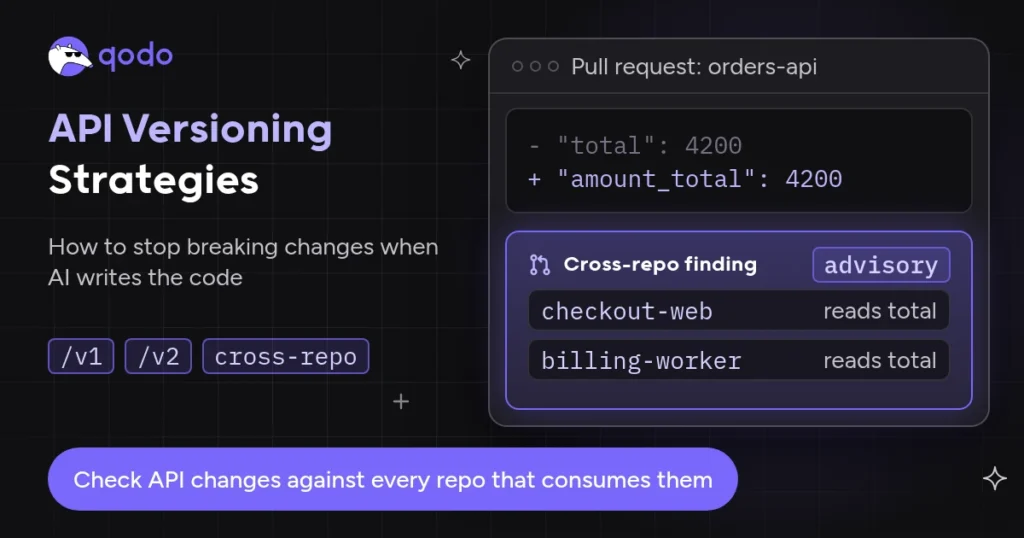
A diff shows what changed, not what the change touches. Ask whether the review reads other repositories, across Git providers, plus past PRs, linked tickets and specs.
One-day check: rename a field another repository reads, and see whether the review flags the consumer.
3. Does one rule list guide the coding agent and the review?
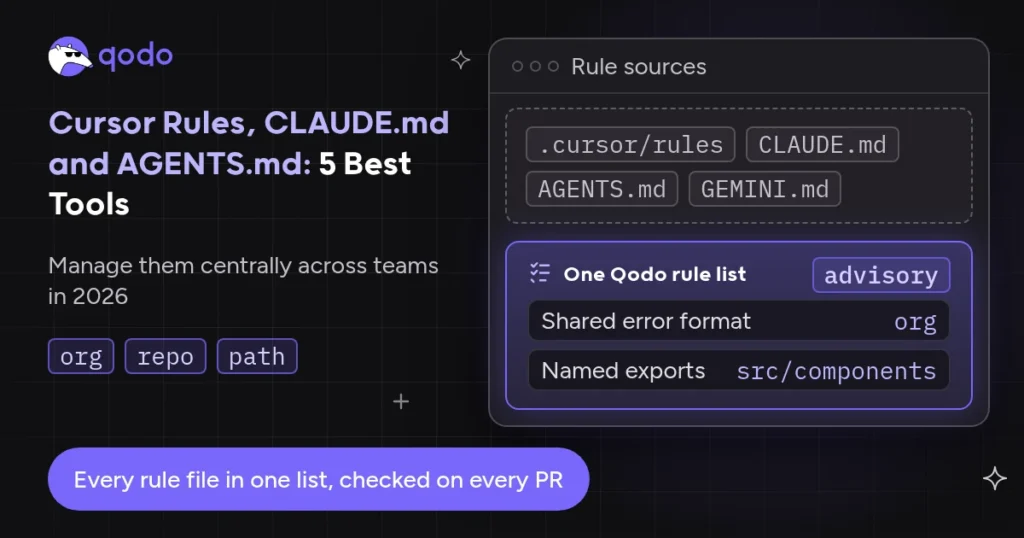
Only 34.6% of developers said coding agents always follow organizational standards in the same Qodo survey. Ask which existing rule files the tool imports and whether the coding agent reads the same rules before writing code.
One-day check: import your AGENTS.md or CLAUDE.md and open a PR that breaks one rule.
4. Does the tool learn from what your reviewers fix and dismiss?
Written rules cover a fraction of what senior reviewers enforce. Ask whether the tool learns from accepted and dismissed suggestions, whose comments count most and who approves a learned rule before it applies.
One-day check: ask for the rules the tool proposes from your last few months of PRs.
5. Can review run before a pull request exists?
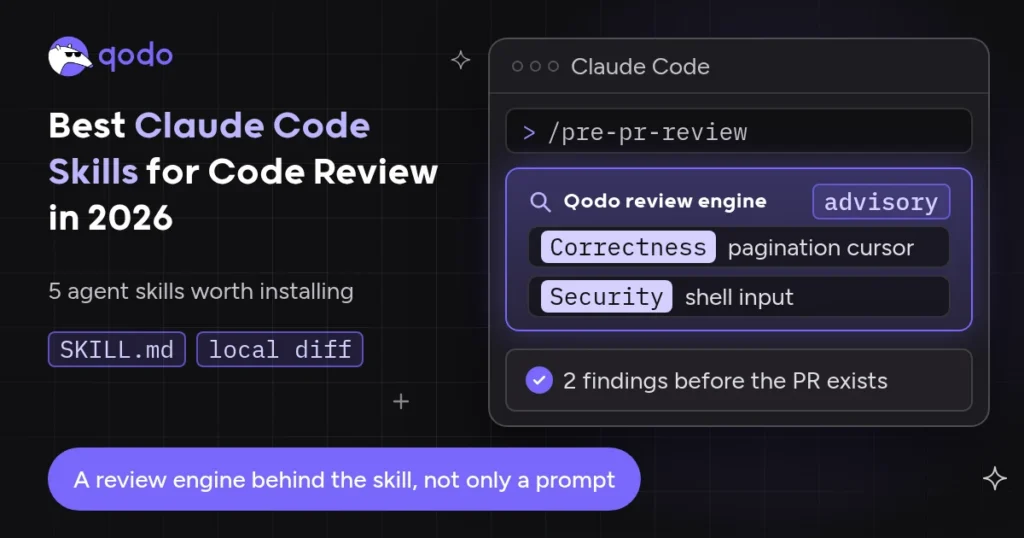
Review that waits for the PR adds a round trip to every fix. Ask whether developers and coding agents can review local changes with the same engine that reviews PRs.
One-day check: run the local review on an uncommitted change and compare the findings with the later PR review.
6. How does the tool keep findings few enough to act on?
Findings become their own queue when every PR collects dozens of them. Ask how the tool matches review depth to risk, marks paths out of scope and records why a developer dismissed a finding.
One-day check: count findings per PR on a busy repository, then count how many authors fixed.
7. Does the tool cover every Git provider and coding agent you use?
Large organizations rarely run one Git provider, and developers rarely use one coding agent. Ask for the provider list, including on-prem editions, and whether rules and context stay the same on each.
One-day check: connect one repository per provider and compare the setup steps.
8. Where does your code go, and which models read it?
InfoSec holds a veto over every AI code review purchase, and the veto usually arrives late. Ask for deployment options from SaaS to air-gapped, model choices including your own keys, certifications and the least permissions the tool needs.
One-day check: send the vendor’s trust package to InfoSec before the first demo.
9. What evidence will leaders see after 30 days?
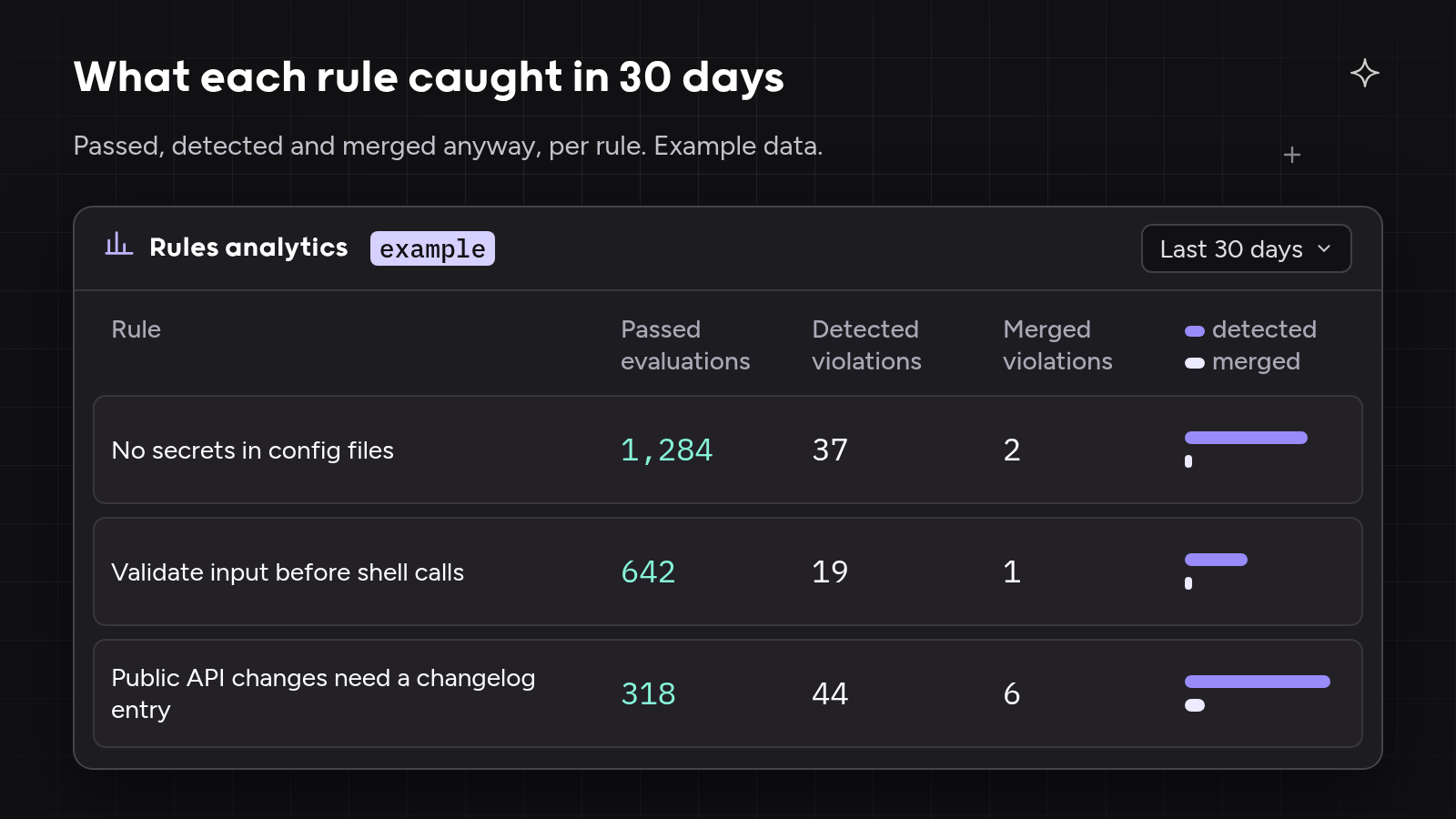
Finding counts show activity, not outcomes. Ask what the tool reports per rule and per repository: how often each rule passed, how many violations it caught and how many merged anyway.
One-day check: ask for a sample report from a live account. Qodo’s guide to the AI code review business case shows how to turn the results into a budget request.
AI Code Review Tools to Put Through the 9 Questions
- Qodo: a dedicated review and governance platform across Git providers and coding agents.
- GitHub Copilot code review: review inside GitHub for teams standardized on Copilot.
- Cursor Bugbot: PR review for teams that write most code in Cursor.
- GitLab Duo Code Review Flow: merge request review inside GitLab.
| AI code review tool | Best for | Where review runs | Standards source |
| Qodo | Enterprise teams with many repositories and coding agents, and high-velocity teams that keep rule files | Local changes and PRs on GitHub, GitLab, Bitbucket and Azure DevOps, plus Gerrit on Enterprise plans | One rule list, imported from existing rule files and learned from PR history |
| GitHub Copilot code review | Teams standardized on GitHub and Copilot | GitHub PRs, IDEs and Azure DevOps (public preview) | copilot-instructions.md, path instructions, AGENTS.md |
| Cursor Bugbot | Teams that write most code in Cursor | PRs on GitHub, GitLab, Bitbucket and Azure DevOps, plus a pre-push command in Cursor | Team rules, BUGBOT.md and learned rules |
| GitLab Duo Code Review Flow | Teams standardized on GitLab | GitLab merge requests | mr-review-instructions.yaml |
Qodo
Tool overview
Qodo is a code review and governance platform that reviews code from every coding agent on GitHub, GitLab, Bitbucket and Azure DevOps, plus Gerrit on Enterprise plans. Qodo reviews local changes before a PR, reviews every PR with the same engine and enforces one rule list across all repositories.
Main features
- Cross-repo context. Qodo’s cross-repo review maps relationships between repositories, across Git providers, and raises a Cross-repo finding with a link to the affected lines.
- One rule list for agents and PRs. Qodo imports AGENTS.md, CLAUDE.md, GEMINI.md, .cursorrules and copilot-instructions.md, and the Get Rules skill hands the same rules to coding agents before they write.
- Learned rules. Qodo’s rules detection agent proposes rules from accepted review comments, weighted by reviewer code ownership, and lowers the signal of suggestions teams reject. Proposed rules wait as pending rules for approval.
- Review before the PR. The Qodo Agentic Toolbox runs
qodo reviewon local changes from the CLI, Claude Code, Codex and Kiro. - Rules analytics. Per-rule passed evaluations, detected violations and merged violations for the last 30 days.
- Deployment. Multi-tenant SaaS, plus single-tenant SaaS, on-prem and air-gapped deployment and bring-your-own LLM keys on Enterprise plans, with SOC 2 Type II documentation in the Qodo Trust Center.
Best for
Enterprise engineering teams that need one standard across many repositories, Git providers and coding agents, with deployment InfoSec approves. High-velocity teams that want their existing rule files checked on every PR, with setup taking about 5-10 minutes for cloud Git providers.
How it compares
Qodo answers all 9 questions from one platform outside every coding tool. Findings are advisory: authors fix them or dismiss them with a recorded reason, and branch protection decides what merges.
GitHub Copilot code review
Tool overview
GitHub Copilot code review reviews pull requests on GitHub and in IDEs, with Azure DevOps support in public preview. Copilot code review is part of GitHub Copilot, which also writes code through its coding agent.
Main features
- Agentic review with full-project context on GitHub Actions runners.
- Reads copilot-instructions.md, path-specific instruction files and AGENTS.md from the PR’s head branch.
- Effort levels from Lite to Max, billed as AI credits plus Actions minutes.
Best for
Teams standardized on GitHub and Copilot that want review inside the same subscription.
How it compares
Copilot code review covers GitHub and Azure DevOps (preview) but not GitLab or Bitbucket. Context comes from the repository under review and any configured MCP servers.
Cursor Bugbot
Tool overview
Cursor Bugbot reviews pull request diffs for teams that use Cursor, on GitHub, GitLab, Bitbucket and Azure DevOps, including on-prem editions of GitHub, GitLab and Bitbucket.
Main features
- Team rules, nested BUGBOT.md files and learned rules from merged or closed PRs.
- A
/review-bugbotcommand that runs review in the Cursor agent before pushing. - Rule analytics with issues found, issues accepted and acceptance rate.
Best for
Teams that write most of their code in Cursor and want PR review from the same vendor.
How it compares
Bugbot reads the PR diff and earlier PR comments. Cursor project rules in .cursor/rules do not apply to Bugbot, so teams keep review rules in separate files.
GitLab Duo Code Review Flow
Tool overview
GitLab Duo Code Review Flow is part of the GitLab Duo Agent Platform and reviews merge requests on GitLab.com, GitLab Self-Managed and GitLab Dedicated.
Main features
- Runs as a CI/CD job, triggered by assigning the Duo reviewer or by automatic reviews.
- Pre-scans the merge request diff and related files in the project, up to about 1 MiB of context.
- Custom instructions in mr-review-instructions.yaml.
- Models running in your own infrastructure for GitLab Self-Managed.
Best for
Teams standardized on GitLab, including teams that need models running in their own infrastructure.
How it compares
Code Review Flow reads the project under review and does not reference AGENTS.md or SKILL.md files. Follow-up reviews reuse earlier Duo threads, so a reply with an explanation stops a point being raised again.
How We Evaluated AI Code Review Tools Against the 9 Questions
I checked each tool against the 9 questions using its official documentation on 3 Nov 2026. The table records what each tool documents, not a score, so you can repeat the check on your own repositories.
| Question | Qodo | GitHub Copilot code review | Cursor Bugbot | GitLab Duo Code Review Flow |
| 1. Separate reviewer | Review platform outside every coding agent | Part of GitHub Copilot | Part of Cursor | Part of GitLab Duo Agent Platform |
| 2. Context beyond the diff | Cross-repo, across Git providers; tickets | Full repository; MCP servers | PR diff and PR comments; MCP on Team and Enterprise | Related files in the project, about 1 MiB |
| 3. One rule list for agent and review | Imported rule files; Get Rules for agents | Instructions and AGENTS.md | BUGBOT.md and team rules | mr-review-instructions.yaml |
| 4. Learning | Rule Miner, ownership-weighted, approval step | Copilot Memory | Learned rules from merged or closed PRs | Replies stop repeat points |
| 5. Before the PR | qodo review in CLI, Claude Code, Codex, Kiro |
IDE review | /review-bugbot in Cursor |
Merge request review |
| 6. Signal control | Review effort mode, REVIEW.md scope, dismissals with reasons | Effort levels | Effort levels | Instructions file |
| 7. Git providers | GitHub, GitLab, Bitbucket, Azure DevOps; Gerrit on Enterprise | GitHub, Azure DevOps (preview) | GitHub, GitLab, Bitbucket, Azure DevOps | GitLab |
| 8. Deployment and models | SaaS, single-tenant, on-prem, air-gapped; BYOK | GitHub cloud service | Cursor cloud service | GitLab.com, Self-Managed, Dedicated; models in your infrastructure |
| 9. Leader evidence | Per-rule analytics, 30 days, CSV | Not listed in review docs | Rule analytics, acceptance rate | Not listed in review docs |
When to Use Qodo vs a Code Review Tool Built Into Your Coding Platform
A review tool built into your coding platform works when one Git provider and one coding agent cover the whole team. Copilot code review suits a GitHub and Copilot shop, Bugbot suits a Cursor shop and Code Review Flow suits a GitLab shop.
Qodo suits teams where code arrives from several coding agents, repositories depend on each other or more than one Git provider is in use. Qodo keeps one rule list and one review across all of them, so the review does not change when a team switches agent. Qodo runs alongside SAST and SCA scanners, which keep checking dependencies and known vulnerability patterns.
What We Found Asking the 9 Questions
Every tool on the list answered some questions well. Copilot code review reads AGENTS.md and the full repository, Bugbot learns rules from merged PRs and reviews before pushing, and Code Review Flow runs inside GitLab Self-Managed with models in your own infrastructure.
Only Qodo combined a reviewer outside every coding tool, cross-repo context across Git providers, rules learned from what reviewers fix and dismiss, and one rule list for agents and PRs, then closed the loop with review before the PR and on it.
Where AI Code Review Shortlists Broke Down: 3 Examples
The three examples below are illustrative composites based on patterns we hear on customer calls. No real company, figure or quote is used.
Shortlist example 1: InfoSec vetoed the pilot in week three
A platform team ran a two-week trial of a cloud-only review tool on a non-critical repository and liked the findings. InfoSec then asked where the code went and which models read it, and the answers ruled the tool out for production repositories.
The team restarted with deployment settled first. Qodo’s single-tenant option ran in the company’s own cloud account, and the trust package went to InfoSec on day one.
Shortlist example 2: three coding agents, three rule files
A product organization used three coding agents, and each team kept standards in a different file: CLAUDE.md, .cursorrules and copilot-instructions.md. A review tool tied to one agent read one file, so two teams’ standards never reached review.
Qodo imported all three files into one rule list. Every PR was checked against the same rules, whichever agent wrote the code.
Shortlist example 3: the pilot reported comments, not outcomes
A pilot ended with a report of comment counts, and the engineering director could not tell whether quality had improved. Finance asked for evidence tied to outcomes and the renewal stalled.
The second pilot tracked Qodo’s rules analytics: passed evaluations, detected violations and violations merged anyway, per rule and per repository. The director showed which rules caught issues before merge.
Hands-On: Check Qodo Against the 9 Questions in One Week
The steps follow Qodo’s docs as of 3 Nov 2026. For the full trial plan, including success criteria and a vendor scoping table, use Qodo’s guide to running an AI code review POC.
- Connect one repository per Git provider (question 7). Install Qodo on a GitHub, GitLab, Bitbucket or Azure DevOps repository, or a Gerrit repository on Enterprise plans, and open a PR to see the first review.
- Import the rule files you already keep (question 3). Go to Configurations > Context > Review standards > Rule import. Qodo looks for AGENTS.md, CLAUDE.md, GEMINI.md, best_practices.md, RULE.md, .cursorrules, copilot-instructions.md and pr_compliance_checklist.yaml by default.
- Mark what is out of scope (question 6). Enable REVIEW.md under Configurations > Context > Review standards, or in
.pr_agent.toml, and commit a REVIEW.md at the repository root:
[review_agent]
enable_review_md = true
# REVIEW.md

## Out of scope

Don't raise findings here: `scripts/`, `**/*_generated.*`, `tests/fixtures/`.
- Review before the PR (question 5). Install the Agentic Toolbox and run a local review on uncommitted changes:
curl -fsSL https://get.qodo.ai | sh
qodo review
Reviewing acme/widgets @ a1b2c3d4e, 3.2KB of local changes

Correctness/action_required
→ Off-by-one in pagination cursor (src/api/list.ts)

Security/action_required
→ Unescaped input in a shell command (src/jobs/run.ts)

2 finding(s), fixed before any pull request exists
- Add a cross-repo relationship (question 2). Link a service repository to a repository that consumes the service, then open a PR that renames a shared field and check for a Cross-repo finding.
- Review learned rules (question 4). Run Qodo’s rules detection agent on a repository with PR history and approve or reject the proposals under pending rules.
- Read the results (question 9). Open Rules analytics for passed evaluations, detected violations and merged violations per rule over the last 30 days.

How to Choose an AI Code Review Tool for Your Team
- List your Git providers and coding agents. One of each favors the platform’s built-in reviewer; several favor a dedicated review layer.
- Settle deployment with InfoSec. Rule out any tool InfoSec would never approve.
- Test context and standards on your own code. Use a cross-repo change and a rule from your rule files.
- Measure outcomes, not comments. Pick the tool whose reports show which rules caught issues before merge.
Summary
The 9 questions sort AI code review tools by what is hardest to change after purchase: independence, context, standards, learning, review before the PR, signal, coverage, deployment and evidence. Agents started more than 40% of pull requests on GitHub in September 2026, up from 17% in March, according to GitHub Octoverse 2026, so the answers shape how much agent code a team can merge.
Qodo answers all 9 from one review and governance platform. Teams get agent code merged sooner with fewer rollbacks: enterprise engineering teams get one rule list across many repositories and agents, and high-velocity teams get their rule files checked on every PR, with setup taking about 5-10 minutes for cloud Git providers. Qodo’s guide to rolling out AI code review covers the step after the shortlist.
FAQs
What should you ask an AI code review vendor before a POC?
Ask whether the reviewer is separate from the coding tool, what context it reads beyond the diff, where standards live and whether it learns from your reviewers. Settle deployment, models and certifications with InfoSec before the POC starts, so the trial runs on a setup production can approve.
Should the code review tool be separate from the coding assistant?
A separate review tool checks every coding agent’s output with the same rules, and a reviewer built into one coding tool shares that tool’s blind spots. Qodo reviews code from Claude Code, Codex, Cursor, Copilot and other agents with one engine and one rule list.
How do you run an AI code review POC in a regulated environment?
Start with deployment: confirm the tool runs single-tenant, on-prem or air-gapped, and send SOC 2 documentation to InfoSec on day one. Qodo supports all three deployment options on Enterprise plans, including air-gapped installs for GitHub Enterprise Server, GitLab Self-Managed, Bitbucket Data Center and Gerrit.
How do you measure the ROI of AI code review?
Measure which rules caught issues before merge and how many violations merged anyway, per repository, rather than counting comments. Qodo’s rules analytics report passed evaluations, detected violations and merged violations per rule, which feed a business case for renewal or expansion.
Can AI code review enforce security policies?
AI code review enforces security policies written as rules, such as input validation or secrets handling, on every PR. Qodo checks security rules alongside correctness and team standards, and runs next to SAST and SCA scanners rather than in place of them.
Ethical use of AI
We use AI to proofread and organise our ideas. The substance comes from our team of developers and technical experts: every fact is traced back to its original source, and every example is hand-crafted and tested.
About the author