Cursor Rules, CLAUDE.md and AGENTS.md: 5 Best Tools to Manage Them Centrally Across Teams (2026)

Every coding agent reads its own rule file, so teams end up with Cursor rules, CLAUDE.md, AGENTS.md and Copilot instructions in every repository, and nobody can say which rules still hold. The guide below shows what each file does, with examples, and the five best tools to manage them centrally in 2026. The payoff is agent code merged sooner with fewer rollbacks: enterprise engineering teams get the same rules enforced across many repos and coding agents, and high-velocity teams get the rule files they already keep checked on every pull request (PR), with no new process.
TL;DR
- Each rule file shapes one agent in one repo. Cursor rules, CLAUDE.md, AGENTS.md and Copilot instructions give context to the agent that reads them, inside the repository that holds them.
- Rule files are context, not enforcement. Only 34.6% of developers said coding agents always follow organizational standards, according to the Qodo State of AI Code Quality 2026.
- Central rule management has five parts. One rule source, rules in the agent session before it writes, an independent check on every PR, learning from the team, and evidence per rule.
- Qodo imports every Cursor rules file, CLAUDE.md and AGENTS.md into one rule list and checks every PR against it with cross-repo context, so teams merge agent code sooner with fewer rollbacks. Enterprise engineering teams get one rule list enforced across many repos and coding agents, with per-rule evidence of what merged, and high-velocity teams get the rule files they already keep checked on every PR, with setup in minutes.
The 5 Best Tools to Manage Cursor Rules, CLAUDE.md and AGENTS.md
- Qodo: one rule list for every coding agent, checked on every PR.
- Cursor Team Rules: dashboard rules for Cursor Agent across a team’s projects.
- GitHub Copilot custom instructions: organization, repository and path instructions for Copilot.
- Claude Code managed CLAUDE.md: one machine-wide CLAUDE.md deployed by IT.
- Ruler: one
.ruler/folder written out to many agents’ files.
| Tool | What it manages | Best for |
| Qodo | One rule list from every rule file, for any agent and every PR | Enterprise teams enforcing the same rules across many repos and agents, and high-velocity teams checking existing rule files on every PR |
| Cursor Team Rules | Dashboard rules for Cursor Agent across a team’s projects | Teams standardized on Cursor |
| GitHub Copilot custom instructions | Organization, repository and path instructions for Copilot | Organizations on Copilot Business or Enterprise |
| Claude Code managed CLAUDE.md | Machine-wide CLAUDE.md deployed by IT | IT-managed Claude Code fleets |
| Ruler | One .ruler/ folder synced to many agents’ files |
Developers syncing one repo’s rules across agents |
How to Write Cursor Rules, CLAUDE.md and AGENTS.md, With Examples
What are Cursor rules?
Cursor rules are instructions that Cursor Agent reads before it acts. Project rules are .mdc files in .cursor/rules/, each with description, globs and alwaysApply frontmatter, and the four rule types are Always Apply, Apply Intelligently, Apply to Specific Files and Apply Manually. User Rules cover one developer, and Team Rules come from the dashboard. Each rule should stay under 500 lines, according to Cursor’s docs.
Cursor rules examples
Cursor rules example 1 always applies, so every agent request in the repo carries the same two instructions:
---
description: Repository-wide conventions
alwaysApply: true
---

- Add the company copyright header to every new source file.
- Never edit files under dist/. Change the source and rebuild.
Cursor rules example 2 applies only to React components, through a glob pattern:
---
description: React component conventions
globs: src/components/**/*.tsx
alwaysApply: false
---

- Use named exports, never default exports.
- Keep each component under 200 lines. Split larger components.
What is CLAUDE.md?
CLAUDE.md is the instruction file Claude Code loads at the start of every session, at four scopes: managed policy, user, project and local. Rules for specific paths go in .claude/rules/ with paths frontmatter, and Claude Code falls back to AGENTS.md when a repo has no CLAUDE.md. CLAUDE.md works best under 200 lines, according to Anthropic’s docs.
What is AGENTS.md?
AGENTS.md is an open instruction format in plain Markdown that several agents read, including Cursor, Claude Code, Codex and GitHub Copilot’s coding agent. A nested AGENTS.md applies to its own folder in Cursor, so a monorepo can give the payments service different instructions from the web app. Qodo’s glossary explains AGENTS.md files in more depth.
What are Copilot custom instructions?
Copilot custom instructions live in .github/copilot-instructions.md for the whole repo and in .github/instructions/*.instructions.md for specific paths. Copilot also reads AGENTS.md, CLAUDE.md or GEMINI.md as agent instructions. Organizations on Copilot Business or Enterprise can add organization instructions in settings, which apply to sessions on github.com and to Copilot code review, but not to local editor sessions.
Where Cursor rules and CLAUDE.md files stop
- Each tool reads its own files. Cursor rules do not reach Copilot, and Copilot instructions do not reach Claude Code unless someone copies them.
- Rule files live per repository. A standard that applies to two hundred repos needs two hundred edits, or a sync job.
- Nothing reports whether a rule held. None of the four formats records which rules the agent followed or which ones a PR broke.
- The vendors describe rule files as guidance. Claude treats CLAUDE.md files “as context, not enforced configuration”, according to Anthropic. Custom instructions do not guarantee generated content will comply with a policy, according to GitHub. AI guidance should not be your only security control, according to Cursor.
Why Cursor Rules and CLAUDE.md Files Sprawl Across Teams
Rule files grow with the number of repos and tools, not with the organization, so standards drift and nobody can prove which ones hold. A platform team that supports Cursor, Claude Code and Copilot ends up with three formats per repository, each edited by whoever touched the file last. Guidelines belong in version control next to the code, according to Stack Overflow’s March 2026 guide to shared coding guidelines. Following that advice multiplies the files further across repos.
41.7% of engineering leaders said they have centralized AI coding standards, and 37.0% said they enforce policy across teams and repositories, according to the Qodo State of AI Code Quality 2026. Writing a standard down is the easy half. Checking that every agent and every PR follows the standard is the half most organizations still lack.
Agent context now sits scattered across AGENTS.md, CLAUDE.md and skill files, and each organization and sub-organization handles those files differently, so the files alone do not bring the trust and consistency teams want, as Itamar Friedman, Co-founder and CEO of Qodo, said in his AI Engineer World’s Fair 2026 talk The Last Human Code Review.
On platform teams, the root CLAUDE.md stops being enough, partner teams’ repositories become a blind spot, and reviewers flag the same issue on PR after PR because the rule never reached the file the agent read. Qodo’s post on why Cursor rules won’t scale makes the longer case for treating rules as a living system.
What Is the Best Tool to Manage Cursor Rules, CLAUDE.md and AGENTS.md Centrally?
The best tool to manage Cursor rules, CLAUDE.md and AGENTS.md centrally treats rules as a governance job. I compared every tool on five tests, in this order:
- One rule source for every agent, scoped by org, repo and path. The tool reads the rule files teams already keep, in every format, and scopes them without copying files around.
- Rules reach the agent before it writes. The agent gets the rules for its task during the session, before a PR exists.
- An independent check on every PR, with cross-repo context. A reviewer separate from the writing tool checks the change against the same rules, knows what other repos depend on and names the rule in each finding.
- Learning from what the team fixes or skips. The tool proposes rules from PR history and adjusts when findings are ignored.
- Per-rule evidence leaders can read. The tool shows per rule what passed, what was flagged and what merged anyway.
Qodo is the best choice for managing coding-agent rules across teams and repositories because Qodo imports every rule file into one list, hands the list to any agent before it writes, reviews every PR against the list with cross-repo context, learns from what the team fixes or skips, and reports per rule what merged.
How We Compared Rule Management Tools
I compared each tool on the five tests using its official docs, opened on 2 Nov 2026.
| Tool | One source, scoped | Before the agent writes | Independent check with cross-repo context | Learns from the team | Per-rule evidence |
| Qodo | Yes: imports AGENTS.md, CLAUDE.md, copilot-instructions.md, .cursor/rules and more; org, repo and path scope |
Yes: Get Rules through the CLI, MCP, Claude Code, Codex and Kiro | Yes: PR review separate from the writing agent, with cross-repo context | Yes: Rule Miner, plus learning from fixed or skipped findings | Yes: Rules analytics with Merged violations and CSV export |
| Cursor Team Rules | Partial: dashboard rules for Cursor Agent; Bugbot uses its own rule sources | Yes: Cursor Agent | Reviewer from the same vendor (Bugbot) | Yes, in Bugbot (learned rules) | Partial: Bugbot rule analytics |
| GitHub Copilot custom instructions | Partial: org instructions for github.com and Copilot code review; repo files | Yes: Copilot | Reviewer from the same vendor (Copilot code review) | Not documented | Not documented |
| Claude Code managed CLAUDE.md | Partial: machine-wide file, Claude Code only | Yes: Claude Code | Not covered: docs point to hooks and permissions | Partial: auto memory per machine | Not covered |
| Ruler | Partial: one .ruler/ folder per repo |
Yes: writes the files agents read | Not covered | Not covered | Not covered |
The 5 Best Tools to Manage Cursor Rules, CLAUDE.md and AGENTS.md Across Teams
Qodo
Tool overview
Qodo is an AI code review and code governance platform that turns scattered coding agent rules into one list and checks every PR against the list, starting from the files teams already keep.
Main features
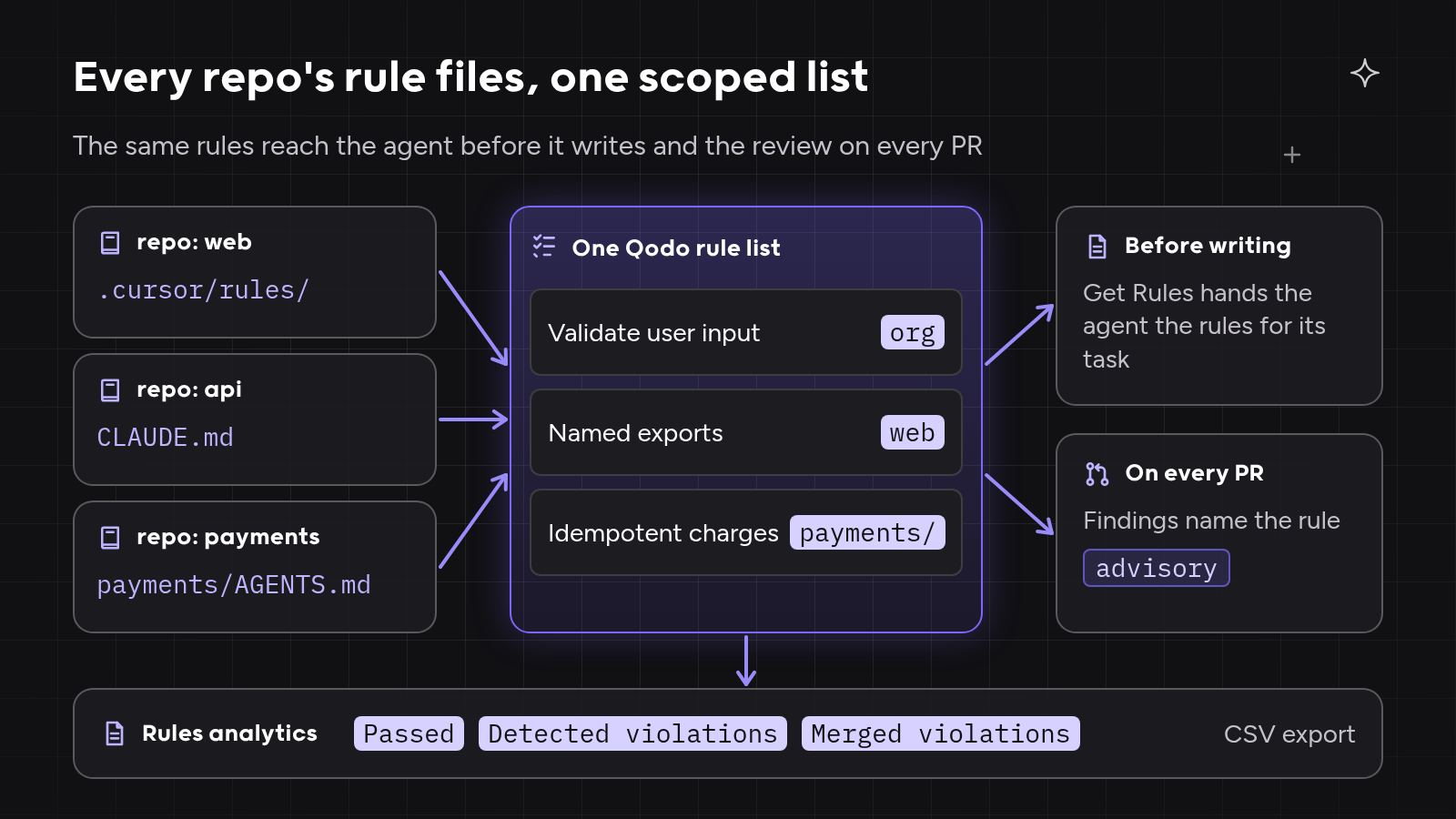
- Rule import from every format. Qodo imports AGENTS.md, CLAUDE.md, GEMINI.md, copilot-instructions.md, everything in
.cursor/rules/(including.cursorrulesand.mdc), RULE.md, SKILL.md files andpr_compliance_checklist.yaml, then normalizes each rule with category, severity, scope and examples, and picks up file changes on push. - Scope by org, repo and path. Rules are global by default and can be narrowed to Git organizations, repositories and path patterns. Folder placement scopes imported rules, so rules in
src/payments/AGENTS.mdapply only undersrc/payments/. - Rules before the agent writes. The Get Rules skill in the Qodo Agentic Toolbox hands Claude Code, Codex, Kiro or any MCP-compatible agent the rules for its task.
- Review before the PR and on the PR. Local review in the agent loop uses the same engine as PR review, and PR findings across GitHub, GitLab, Bitbucket and Azure DevOps name the rule they enforce.
- Cross-repo context. Qodo’s review knows what other repositories depend on, so a rule about a shared contract is checked against its consumers.
- Learning. Rule Miner proposes rules from accepted review comments, admins can edit, activate or remove any rule, and Qodo deactivates a rule whose findings are rarely fixed unless an admin locks it.
- Evidence. Rules analytics shows Passed, Detected violations and Merged violations per rule for the last 30 days, with a CSV export.
Best for
Teams that want agent code merged sooner with fewer rollbacks. Enterprise engineering teams get the same rules enforced across many repos and coding agents, with per-rule evidence leaders can read. High-velocity teams get the Cursor rules, CLAUDE.md and AGENTS.md files they already have checked on every PR, with setup in minutes and no new process.
How it compares
Qodo passes all five tests. Every agent and the reviewer read one rule list, the reviewer sees across repos, and leaders see per rule what merged anyway. As a supporting point, you can’t review code with the same tool that wrote it, and Qodo works with whichever agent wrote the change.
Cursor Team Rules
Tool overview
Cursor Team Rules are rules for Cursor Agent, managed from the Cursor dashboard on Team and Enterprise plans.
Main features
- Admins create team-wide rules and can enforce them so members cannot switch them off.
- Team Rules apply across every repository and project for the team, with glob patterns for file types.
- Bugbot, Cursor’s PR reviewer, uses its own rule sources (Bugbot team rules,
.cursor/BUGBOT.mdand learned rules) and reports rule analytics.
Best for
Teams standardized on Cursor that want one dashboard for Cursor Agent rules.
How it compares
Cursor Team Rules are strong inside Cursor. Rules for other agents, and the rules Bugbot checks, live in separate places.
GitHub Copilot custom instructions
Tool overview
GitHub Copilot custom instructions are instruction files and organization settings that tailor Copilot’s answers, agent sessions and reviews.
Main features
- Repository-wide
.github/copilot-instructions.mdand path-specific.github/instructions/*.instructions.md. - Agent instructions from AGENTS.md, CLAUDE.md or GEMINI.md.
- Organization instructions for Copilot Business and Enterprise, used on github.com and in Copilot code review.
Best for
Organizations on Copilot Business or Enterprise that want org-wide guidance inside GitHub.
How it compares
GitHub Copilot custom instructions cover Copilot’s own tools well. No per-instruction record of what held appears in the docs opened on 2 Nov 2026.
Claude Code managed CLAUDE.md
Tool overview
A managed CLAUDE.md is an organization-wide CLAUDE.md that IT deploys to every developer machine running Claude Code.
Main features
- A managed policy file at fixed OS paths, such as
/etc/claude-code/CLAUDE.md, or theclaudeMdkey in managed settings. - Distribution through mobile device management (MDM), Group Policy or Ansible; developers cannot exclude the file.
- Managed settings such as
permissions.denyfor hard limits on what Claude Code may do.
Best for
IT teams that manage Claude Code across a fleet of machines.
How it compares
A managed CLAUDE.md reliably reaches every Claude Code session. The file has no PR check and no per-rule record.
Ruler
Tool overview
Ruler is an open-source command-line tool (MIT license) that keeps one copy of agent instructions in a .ruler/ folder and writes the copy out to each agent’s own files.
Main features
- Markdown rules in
.ruler/, with nested folders for parts of a project andruler.tomlto pick agents and output paths. - Writes AGENTS.md, CLAUDE.md and other agents’ files, and adds generated files to
.gitignore.
Best for
Developers who use several agents in one repo and want one file to edit.
How it compares
Ruler solves file sync inside one repository. Ruler has no review step, no learning and no evidence of what held.
When to Use Rule Files, a Sync Tool or Central Rule Governance
Plain rule files work for one team, one agent and a handful of repos, where a .cursor/rules folder or a CLAUDE.md gives the agent enough context.
A sync tool such as Ruler works when one repo uses several agents. Editing one .ruler/ folder beats copying rules into AGENTS.md and CLAUDE.md by hand, but a sync tool says nothing about whether a rule held.
Central rule governance works when many teams, agents and repositories share standards. In my experience, the switch point comes when a platform team can no longer answer “which repos merged code that broke the rule last month?” without asking every team, a question Qodo answers from Rules analytics.
Where Rule-File Management Broke Down: 3 Examples
The three examples below are illustrative composites based on patterns from customer calls. No real company, figure or quote is used.
Rule management example 1: a security rule that had to reach every agent
A platform team supported engineers on Cursor, Claude Code and Copilot across many repos, with .cursor/rules, CLAUDE.md or AGENTS.md depending on the repo. A new security rule meant editing every file in every repo and hoping every agent read the right one.
With Qodo, the team imported the existing files into one list and added the security rule once, scoped to the whole organization. Get Rules handed the rule to each agent before it wrote, and Rules analytics showed which repos still merged a violation.
Rule management example 2: a monorepo where ownership followed folders
A mid-size SaaS company ran one large monorepo, and each team owned its own subfolders. One root rule file could not give the payments folder stricter rules than the web app.
Qodo scoped rules by folder placement and path pattern, so rules from payments/AGENTS.md applied only to payments code, and the platform team still saw every rule in one list.
Rule management example 3: a root CLAUDE.md that could not see partner repos
A multi-product software company relied on a root CLAUDE.md in each repository. Changes to a shared client broke services owned by partner teams, because no rule file knew those repositories existed.
Qodo’s review checked each change with cross-repo context and flagged the downstream consumer on the PR. The team then turned the recurring finding into an org-wide rule, so the same check reached every agent.
Hands-On: Turn Every Repo’s Cursor Rules, CLAUDE.md and AGENTS.md Into One Qodo Rule List
The steps follow Qodo’s docs as of 2 Nov 2026. Screenshots come from a demo org, with org, repo and user names blurred.
- Choose the rule sources. In the Qodo portal, open Configurations, Context, Review standards, Rule import. Keep the default file names, add folders such as
.cursor/rules, and write rule import instructions, for example “Extract enforceable coding standards only; skip build and setup commands.” - Import from many repos at once. Open the Import rules and skills dialog, tick the organizations and repositories, and click Import. Folder placement scopes each imported rule.
- Review the one list. Read the Rules page by source and scope. Qodo’s Rules Expert Agent flags conflicts, duplicates and outdated rules for review.
- Give the agent the rules before it writes. Install the Qodo Agentic Toolbox with
curl -fsSL https://get.qodo.ai | sh(Node.js 20 or later), or connect any MCP-compatible agent to the Qodo MCP server with an API key kept in a secret manager. Ask the agent to fetch the rules for the task with Get Rules. - Review before the PR, then on the PR. Run Qodo’s local review on the diff in the agent loop, then open the PR and read the findings, each tied to the rule it enforces.
- Read the evidence. Open Rules analytics, sort by Merged violations and export the CSV for the weekly standards review. Keep Rule Miner on so new rules come from accepted review comments.

Conclusion
Every native tool manages its own agent’s rules well: Cursor Team Rules for Cursor Agent, Copilot custom instructions for Copilot and a managed CLAUDE.md for every Claude Code machine. Ruler syncs files inside one repo. Qodo was the only tool in the comparison that managed one rule list across every agent, repo and PR, with per-rule evidence.
Use the five tests as the buying checklist: one scoped rule source, rules before the agent writes, an independent check on every PR with cross-repo context, learning from the team and per-rule evidence. A tool that passes the five tests gets agent code merged sooner with fewer rollbacks. Enterprise engineering teams get the same rules enforced across many repos and coding agents, and high-velocity teams get the rule files they already keep checked on every PR, with no new process. For a wider comparison of governance platforms, see the hub guide to AI code governance tools.
FAQs
What is the best tool for centrally managing coding-agent rules across teams and repositories?
The best tool for centrally managing coding-agent rules across teams and repositories keeps one rule source, reaches every agent and checks every PR. Qodo imports Cursor rules, CLAUDE.md, AGENTS.md and Copilot instructions into one list, hands the list to agents before they write and reports per rule what merged.
How do I make my coding agent follow my team’s coding rules?
To make a coding agent follow your team’s coding rules, give the agent the rules before it writes and check the result on every PR. Qodo hands the rules to Claude Code, Codex, Kiro or any MCP agent through Get Rules, then reviews each PR against the same rules and shows which ones were broken.
Which AI code review tools enforce CLAUDE.md and AGENTS.md rules?
Several AI code review tools read CLAUDE.md and AGENTS.md. Qodo imports both files, scopes each rule by folder, checks every PR against the rules and records per rule what passed, what was flagged and what merged.
Can Cursor rules and AGENTS.md rules follow monorepo folders and team ownership?
Cursor rules and AGENTS.md rules can follow monorepo folders through glob patterns and nested files. Qodo scopes imported rules by the folder that holds the file and by path patterns, while the platform team sees every rule in one list.
Should rules live in AGENTS.md or in a central system?
Rules should live in both AGENTS.md and a central system, so the files stay where agents read them. Qodo imports the files into one list, picks up changes on push and checks every PR against the rules.
What is the difference between Cursor rules, CLAUDE.md and AGENTS.md?
Cursor rules are .mdc files in .cursor/rules/ that Cursor Agent reads, CLAUDE.md is the instruction file Claude Code loads each session, and AGENTS.md is a shared format several agents read. Qodo imports all three formats into one rule list, so teams can keep whichever files their agents use.
Ethical use of AI
We use AI to proofread and organise our ideas. The substance comes from our team of developers and technical experts: every fact is traced back to its original source, and every example is hand-crafted and tested.
About the author