Best MCP Servers for Codebase Intelligence and Code Review in 2026

The best MCP servers for codebase intelligence and code review tell a coding agent how repositories, services and past pull requests connect, then let the agent call a reviewer on its own changes before anyone opens a pull request. Most servers on general lists hand the agent more files or search results from one place. Below are five MCP servers compared on five tests, plus a setup that works in any MCP client, so your team can merge sooner and more safely.
TL;DR
- Context beats more files. The best MCP servers tell an agent how repositories, services and past pull requests connect, beyond what one file says.
- Agents still miss team standards. Only 34.6% of surveyed developers say agents always follow organizational standards, according to the Qodo State of AI Code Quality 2026.
- Review belongs before the PR and on it. An agent that calls a reviewer on its local diff opens cleaner pull requests, and the pull request review still runs.
- Enterprise access decides adoption. Remote servers with scoped permissions and per-deployment URLs are the ones a security team approves once.
- Qodo gives any agent cross-repo context, pull request history and a callable reviewer through one MCP connection, so agent pull requests arrive already checked against the code they affect. High-velocity teams get a fast, balanced or deep review picked for each change, and enterprise engineering teams get the same engine on the pull request across any Git provider, learning from every finding developers fix or skip.
What Is the Best MCP Server for Codebase Intelligence and Code Review?
The best MCP server for codebase intelligence and code review is the one that answers what a senior engineer would ask before a change: what depends on this, how did we solve the problem last time, what does the team expect, and does the diff hold up. If you are new to the protocol, start with what MCP servers are, then come back to the five tests below.
We judged every server on five tests, in the same order throughout:
- Cross-repo context: the agent can ask which repositories and services depend on a change.
- History: the agent sees past pull requests and past review decisions, beyond current files.
- Team rules: the agent can fetch the coding rules that apply to the task.
- Callable review: the agent can run a code review on local changes and act on structured findings.
- Enterprise-ready access: a remote server with scoped permissions and deployment options a security team can approve.
Agent context remains a known gap: in the Qodo State of AI Code Quality 2026 report, 43% of engineering leaders name insufficient agent context as one of their biggest quality and governance gaps. Curated context files help, but teams find them hard to scale and hard to keep current as repositories multiply.
Qodo passes all five tests through one MCP server. Cross-repo context comes from the Qodo Context Engine, and Reviewer uses the same review engine as Qodo’s pull request review. Rules are one of the five tests; relationships, history, review and access carry equal weight.
How We Evaluated the Best MCP Servers
We compared five MCP servers on the five tests, using each server’s official documentation as opened on 30 October 2026. Tools for docs, browsers, databases and tickets are out of scope, and so are tools that pack a whole repository into one file, which is a different job that our guide to Repomix alternatives covers.
| Server | Cross-repo context | History | Team rules | Callable review | Enterprise-ready access |
| Qodo | Yes | Yes | Yes | Yes | Yes |
| Sourcegraph MCP Server | Yes, search | Yes | No | No | Yes |
| GitHub MCP Server | Partial, GitHub repos | Yes | No | No | Yes |
| Serena | No | No | No | No | No, local |
| Codebase Memory MCP | Partial, inside indexed projects | Partial, diff snapshots | No | No | No, local |
The 5 Best MCP Servers for Codebase Intelligence and Code Review
- Qodo
- Sourcegraph MCP Server
- GitHub MCP Server
- Serena
- Codebase Memory MCP
| Server | Best for | Runs | Access |
| Qodo | High-velocity and enterprise teams whose agents change code other repos depend on | Remote; SaaS, single-tenant or on-premises | API key header |
| Sourcegraph MCP Server | Organizations already on Sourcegraph Enterprise | Remote, on your Sourcegraph instance | OAuth 2.0 or access token |
| GitHub MCP Server | Agents that read and act on GitHub repos, PRs, issues and CI | Remote or local | OAuth or personal access token |
| Serena | Symbol-level navigation and editing in one codebase | Local | Local process |
| Codebase Memory MCP | A local graph of one project’s structure | Local | Local process |
1. Qodo: Cross-Repo Context and an MCP Server for Code Review in One Connection
Tool overview: Qodo is an AI code review and code governance platform. The Qodo Agentic Toolbox exposes Qodo’s managed skills through a remote MCP server, with no local install, so any MCP client that supports Streamable HTTP and custom headers can call them. Plugins for Claude Code and Codex and a Kiro Power cover the same skills, and a CLI covers local scripts.
Main features:
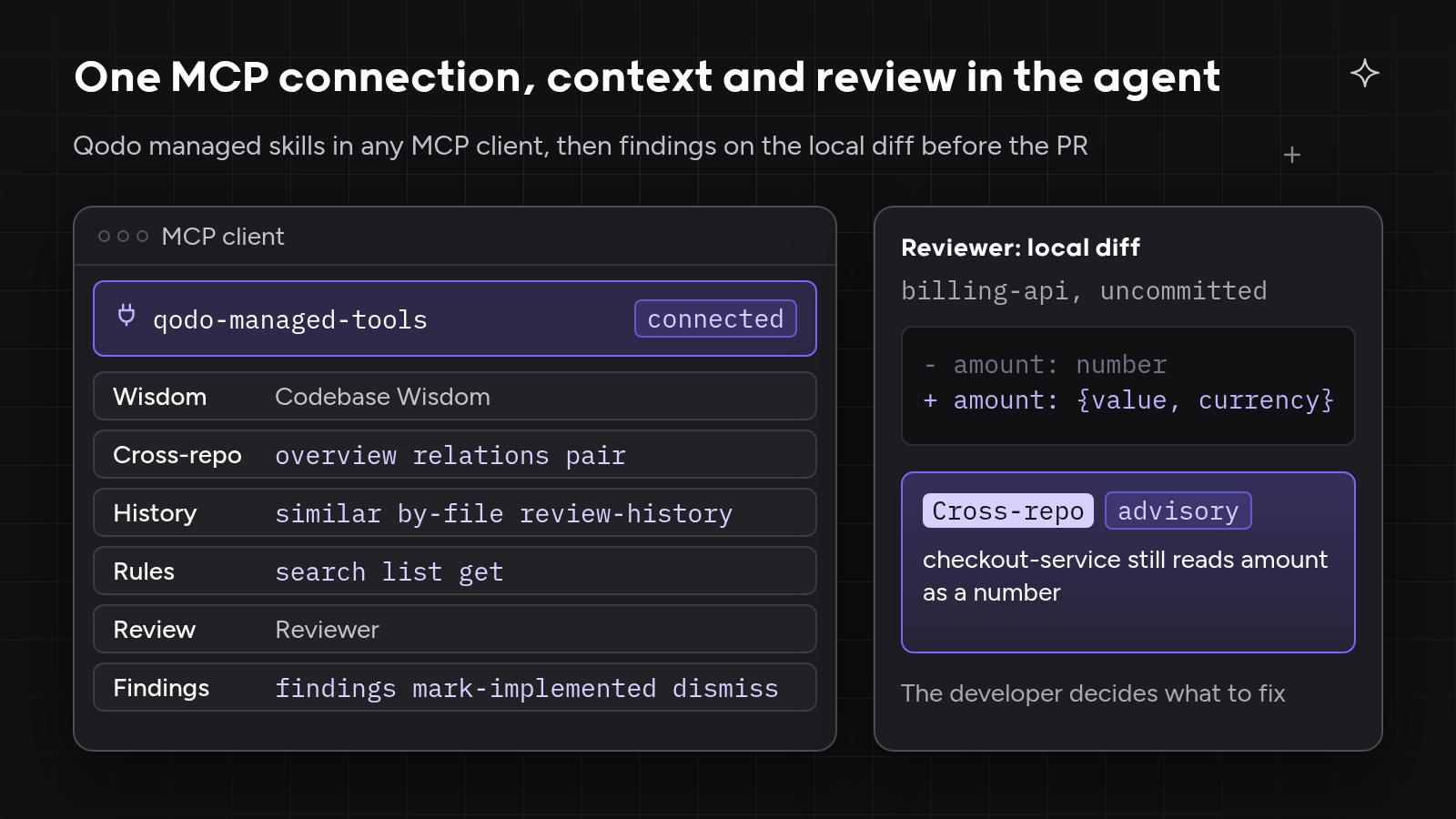
- Cross-repo context engine. Cross-repo tools (
overview,relations,pair) show how repositories relate, and Codebase Wisdom answers questions that span services. - Pull request history. Tools such as
similar,by-fileandreview-historyfind merged pull requests and past review suggestions, including whether the team accepted them. - Learning from fix and skip. Qodo learns from PR history, including accepted suggestions and review comments, as pull requests merge, and ranks a finding by how the team handled similar ones.
- Review before the PR. Reviewer checks local, committed and uncommitted changes with the same engine as Qodo Review, plus session context such as intent, decisions and ticket links.
- Review depth on demand. Local runs choose a fast single-pass or a deeper review; on pull requests, Auto review mode routes each change to a fast, balanced or deep review by risk.
- Findings the agent can act on.
findings,mark-implementedanddismisslet the agent resolve review findings in the same session. - Rules as one pillar. Rules tools (
search,list,get) return the coding rules for a task, and the agent can manage Review Standards. - Review on the PR, on any Git provider. Qodo Code Review continues on the pull request across GitHub, GitLab, Bitbucket, Azure DevOps and Gerrit.
Why Qodo is the best choice for agents that work across repositories: one connection gives the agent context across GitHub, GitLab, Bitbucket and Azure DevOps repositories, the team’s rules for the task, and the same review engine the pull request uses. You can’t review code with the same tool that wrote it, so Qodo’s reviewer stays independent of the agent that made the change. High-velocity teams get agent pull requests that arrive already checked, so they merge sooner.
Enterprise engineering teams get one server their security team can approve once: SaaS, single-tenant and on-premises deployments each have their own MCP URL, and the skills an agent sees follow the user’s Qodo workspace permissions.
Itamar Friedman, Co-founder and CEO of Qodo, wrote on X on 22 October 2026:
“Giving a second agent the title ‘reviewer’ does not establish independence. Two agents can share the same mistaken assumption.”
Itamar Friedman
Best for: teams that want agent code merged sooner with fewer rollbacks. High-velocity teams get pull requests that arrive already checked by a reviewer the agent calls over MCP, with one connection to set up. Enterprise engineering teams get every agent working from the same codebase context and review standards across many repositories, through one server their security team can approve once.
On the five tests: passes all five. The post on what a context engine is covers the architecture behind the server.
2. Sourcegraph MCP Server
Tool overview: the Sourcegraph MCP Server connects agents to a Sourcegraph instance’s code search, navigation and analysis tools. The server is supported on Enterprise plans, according to Sourcegraph’s documentation.
Main features:
- Three endpoints: main search and repository tools, the full tool suite, or Deep Search agent tools only.
- Keyword and natural-language search,
go_to_definitionandfind_referencesacross indexed repositories. commit_searchanddiff_searchfor history.- OAuth 2.0 through dynamic or pre-registered clients, or Sourcegraph access tokens.
- Admins can disable the server or single tools, and an RBAC permission controls MCP access. Users read only repositories they can already access.
Best for: organizations already running Sourcegraph Enterprise that want agents to search code across many repositories.
On the five tests: Sourcegraph passes cross-repo search, history and enterprise access. The server has no team rules for the agent and no callable code review.
3. GitHub MCP Server
Tool overview: GitHub’s official MCP server gives agents access to repositories, issues, pull requests and Actions on GitHub.
Main features:
- A remote server hosted by GitHub, or a local server in Docker or as a binary.
- Toolsets to enable only the groups an agent needs, and a
--read-onlyflag that skips write tools. - Tools to browse code, analyze commits, manage issues and pull requests, and monitor workflow runs.
- GitHub Enterprise Cloud with data residency can use the remote server; GitHub Enterprise Server uses the local server.
Best for: teams whose agents need to read and act on GitHub repositories, pull requests, issues and CI runs.
On the five tests: GitHub’s server covers repository and pull request access and history on GitHub. The server has no relationship map across repositories or Git providers, no team rules and no callable review engine.
4. Serena
Tool overview: Serena is an open-source MCP toolkit for symbol-level code retrieval, editing and refactoring, backed by language servers or a JetBrains plugin.
Main features:
- Semantic retrieval and editing at the symbol level, using relational structure in the code.
- Language-server support for over 40 programming languages.
- Works with any MCP client and runs locally.
- A memory system for long-lived agent workflows.
- GPL-3.0-or-later license.
Best for: developers who want an agent to move through and edit a large single codebase by symbol rather than by text search.
On the five tests: Serena handles in-repo navigation and editing locally, one project at a time. The toolkit has no pull request history, team rules or review.
5. Codebase Memory MCP
Tool overview: codebase-memory-mcp builds a persistent local knowledge graph of code, documentation, configuration and infrastructure, and exposes the graph over MCP.
Main features:
- 17 MCP tools, including
search_graph,trace_pathanddetect_changes, which maps a Git diff to affected symbols. - Traces calls, data flow and cross-service paths through code and infrastructure files.
- Local processing in a pure C binary, with no hosted service or API key.
- Optional graph artifacts so a team can share a baseline.
- MIT license, plus an optional CBM Lens viewer for visual exploration.
Best for: individual developers who want a local graph of one project’s structure for impact questions.
On the five tests: Codebase Memory MCP builds a local relationship graph with change-impact queries. The server has no shared org-wide service, team rules or review.
Best MCP Servers Compared: Context, Rules and Review
| Server | Cross-repo context | History | Team rules | Callable review | Remote, enterprise access | Runs |
| Qodo | Relationships across repos and Git providers | Merged PRs, past suggestions, fix or skip decisions | Rules for the task, Review Standards | Local review with fast or deeper depth; findings to resolve | API key; SaaS, single-tenant and on-premises URLs | Remote |
| Sourcegraph MCP Server | Search and navigation across indexed repos | Commit and diff search | None | None | OAuth or tokens; admin and RBAC controls | Remote, your instance |
| GitHub MCP Server | GitHub repos the user can access | Commits, PRs, issues | None | None | Hosted remote server; toolsets and read-only mode | Remote or local |
| Serena | One project | None | None | None | Local process | Local |
| Codebase Memory MCP | Cross-service paths inside indexed projects | Indexed snapshots and diffs | None | None | Local process | Local |
Where Agent Context Over MCP Breaks Down, and How Qodo Fixes Each Case
The three scenarios below are illustrative composites built from patterns engineering teams describe when they evaluate MCP servers for code review. None is a single customer story.
A typical case: an agent with search but no review loop. A high-velocity team connects a code search server, and the agent finds the right files, yet its pull requests still come back with the same review comments. Search tells the agent where code lives, not whether its change holds up. Qodo’s Reviewer lets the agent review its own diff over MCP before the pull request, and the agent resolves the findings in the same session.
A typical case: related pull requests reviewed one at a time. An enterprise engineering team’s agent splits one task into pull requests across a service and the repositories that consume it. Each pull request looks fine alone, and a server that reads one repository at a time never connects them. Qodo’s cross-repo tools show how the repositories relate, and cross-repo code review flags conflicts with related repositories on the pull request.
A typical case: a context server the security team won’t approve. A platform team wants every agent on one shared context server, but the security team rejects anything that crosses its data boundary or shows users repositories they can’t already see. Local servers on each laptop avoid the approval but give every developer a different context. Qodo’s MCP server has its own URL for SaaS, single-tenant and on-premises deployments, and the skills an agent sees follow the user’s Qodo workspace permissions.
Hands-On: Connect Any Coding Agent to the Qodo MCP Server and Review a Cross-Repo Change
The steps below follow the Qodo MCP docs. The example change touches a shared billing-api that checkout-service consumes. Screenshots in the final post use generic repository and user names, with API keys and emails blurred.
Step 1: create an API key. Create a personal API key in the Qodo portal.
Step 2: add the server. Add Qodo to the client’s mcpServers configuration. Keep the trailing slash on the SaaS URL; without it the server returns a 307 redirect that most clients do not follow. Single-tenant and on-premises customers get the URL from the Qodo portal.
{
  "mcpServers": {
    "qodo-managed-tools": {
      "type": "http",
      "url": "https://sdk.qodo.ai/v1/tools/mcp/",
      "headers": {
        "Authorization": "Bearer ${QODO_API_KEY}"
      }
    }
  }
}
Store the key in the client’s secret manager, never in a committed or shared file. In a Claude Code MCP config the same values apply; Codex and Kiro users can install the Qodo plugin or Power instead.
Step 3: reload and confirm. Restart the client and check that the Qodo managed skills appear. The skills you see follow your Qodo workspace access.
Step 4: ask a cross-repo question. “Which services depend on the billing API?” The agent calls Codebase Wisdom and the cross-repo tools, and names checkout-service before it edits anything.
Step 5: check history and rules. Ask for similar merged pull requests and past review suggestions on the file, then for the rules that apply to an API change.
Step 6: review the local diff. Make the change, then ask the agent to review it with session context: the intent, key decisions and the ticket link. Use a fast pass in a tight edit loop and a deeper review before a significant pull request.
Step 7: resolve findings. The agent fixes what matters, marks those findings implemented, and dismisses the ones that need no change.
Step 8: open the pull request. Qodo Code Review runs on the pull request with the same context, routes the change to a fast, balanced or deep review by risk, and links similar past findings so the reviewer can see how the team handled them.

What We Found Testing MCP Servers for Code Review
Most lists of the best MCP servers stack general feeders: docs, browsers, databases and tickets. Few rank servers by what an agent can learn about the codebase itself.
Search and navigation servers answer “where is this code” well, inside one repository or one index. GitHub’s server gives broad access to GitHub data, and the local graph servers give a single developer structure on one machine.
Only one server on the list combined cross-repo context, review history, team rules and a reviewer the agent can call, with the same engine reviewing the pull request. Enterprise access, from per-deployment URLs to permission-scoped skills, decided what a platform team could approve.
Summary
The best MCP servers for codebase intelligence and code review pass five tests: cross-repo context, history, team rules, callable review and enterprise access. Sourcegraph and GitHub cover search and history, and the two local servers cover structure. Qodo is the best choice for teams whose agents change code across repositories, because one MCP connection gives any agent cross-repo context across GitHub, GitLab, Bitbucket and Azure DevOps, history that learns from fix and skip decisions, the team’s rules and a review before and on the pull request.
FAQs
Which MCP server gives coding agents codebase intelligence and code review in one connection?
An MCP server that combines cross-repo context, pull request history, team rules and a callable reviewer covers both jobs in one connection. Most servers cover search or access only. Qodo’s MCP server gives the agent all four, and the glossary entry on the MCP server for code review explains the category.
What’s the best tool to give a coding agent context on a whole repo?
The best tool lets the agent ask about relationships, history and rules on demand rather than load every file. Packing a repository into one file is a different job and goes stale at the next commit. Qodo keeps context current across repositories and returns the parts each task needs over MCP.
Can an MCP server give a coding agent context across multiple repositories?
Yes, if the server knows how repositories relate rather than indexing one at a time. Code search servers can search across indexed repositories. Qodo’s cross-repo tools explain the relationships between repositories, and Codebase Wisdom answers questions that span services.
Can a coding agent review its own changes through MCP before opening a pull request?
Yes. The agent sends its working-tree diff to a reviewer over MCP and gets structured findings back in the same session. Qodo’s Reviewer uses the same engine as Qodo’s pull request review, so the check runs independently of the agent that wrote the change, and review continues on the pull request.
Do coding agents ignore rules loaded over MCP?
Agents do not always follow loaded rules, which is why a separate review step matters. Scope rules by path so the agent gets the rules that apply to the files it touches. Qodo returns the rules for a task and then checks the diff for compliance, rule by rule, before the pull request and on it.
Can teams use a codebase context engine over MCP beyond code review?
Yes. The same MCP connection that powers review answers questions for planning, coding and custom agents. Teams connect Qodo through APIs and MCP to CI/CD pipelines, internal tools and automations.
Ethical use of AI
We use AI to proofread and organise our ideas. The substance comes from our team of developers and technical experts: every fact is traced back to its original source, and every example is hand-crafted and tested.
About the author