Repomix and Gitingest Alternatives in 2026: Best Tools to Give Your Coding Agent Whole-Repo Context

A coding agent only knows the files in front of it, so many developers pack the repo into one file with Repomix or Gitingest and paste it into the prompt. The guide below explains what each packer does, when a packed file is enough, and five alternatives for the day your agent needs live context across every repository, so the team can merge sooner and more safely.
TL;DR
- Repomix and Gitingest turn one repository into one AI-friendly file. For a single repo and a single question, a packed file is often all you need.
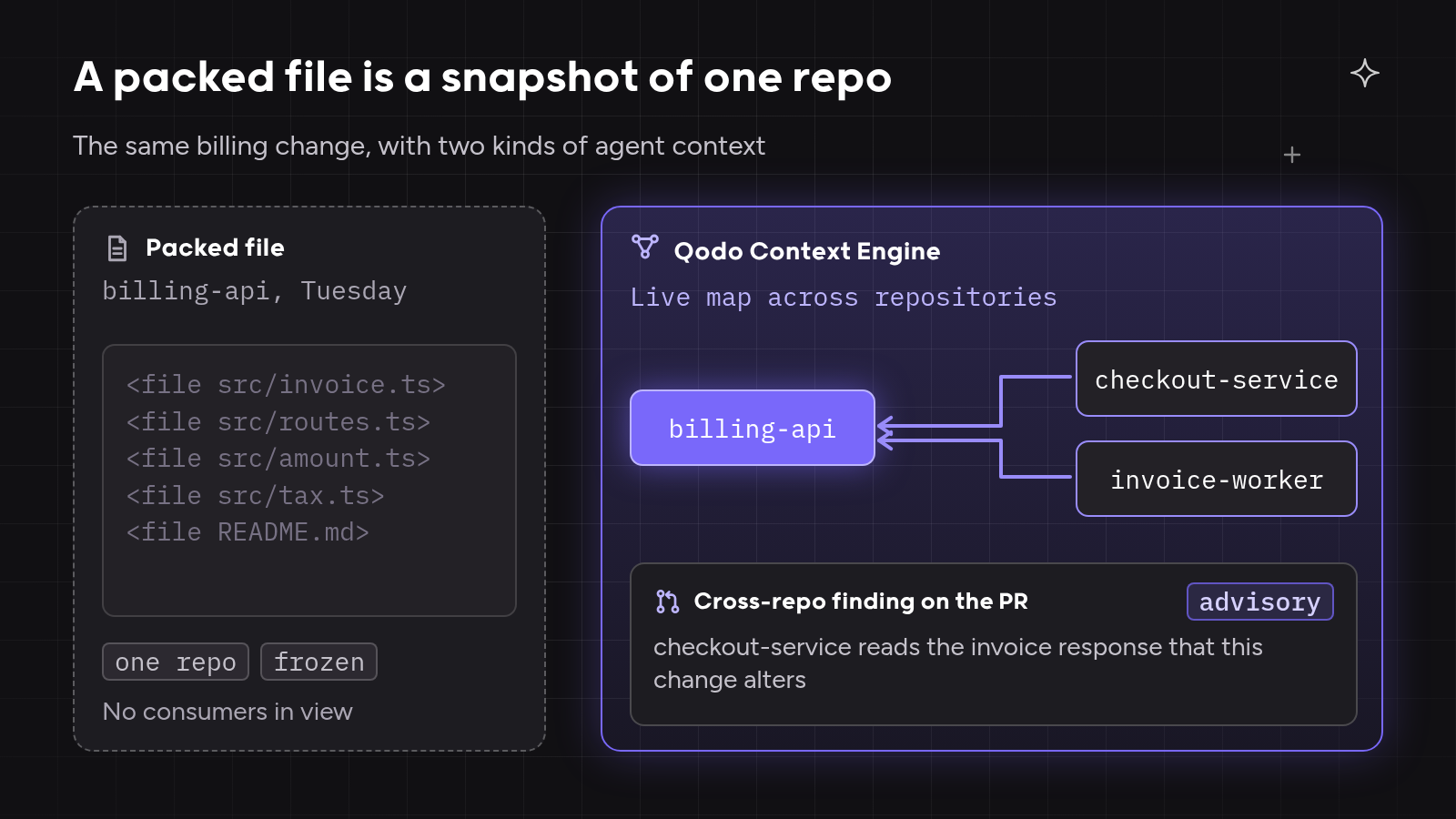
- A packed file is a snapshot. The file misses other repositories, pull request history and team rules, and it goes stale at the next commit.
- MCP servers let the agent ask instead of reading a dump. Code search and repo Q&A servers each cover part of the job.
- The test that matters is scope. Ask whether the tool knows what your code connects to, how it got there, and what the team expects from the next change.
- Qodo gives the agent context across every repository that stays current as pull requests merge, so agent changes arrive with cross-repo breaks already caught. High-velocity teams get that context in Claude Code, Codex, Kiro or any MCP client through the Qodo Agentic Toolbox, with the change reviewed again on the pull request, and enterprise engineering teams get one context across hundreds of repositories.
What Repomix Does and When a Packed File Is Enough
Repomix and Gitingest answer one question well: how do I get this repository into a prompt? Both read a codebase and write a single text file a model can take in one go. The limit of a packed file is scope and freshness, not quality.
What is Repomix?
Repomix is an open-source tool that packs a codebase into a single AI-friendly file. XML is the default output, with Markdown, JSON and plain text as options. Repomix respects .gitignore, counts tokens per file and for the whole repository, and runs Secretlint to leave out files that match known credential formats. An optional Tree-sitter compression mode keeps code signatures and structure and drops implementation detail, so a large repository uses fewer tokens.
How to use Repomix
Run Repomix in the project folder with no install, and it writes repomix-output.xml next to your code:
npx repomix@latest
npx repomix --remote user/repo
repomix --include "src/**/*.ts,**/*.md" --ignore "**/*.log,tmp/"
The --remote flag packs a GitHub repository by URL or user/repo shorthand. repomix --mcp runs Repomix as an MCP server with tools such as pack_codebase, pack_remote_repository and grep_repomix_output. MCP mode is marked experimental, and a --sandbox flag confines the server to one workspace directory, according to the Repomix docs.
What is Gitingest?
Gitingest turns a Git repository into a text digest for LLMs. Replace “hub” with “ingest” in any GitHub URL and the site returns a summary, a file tree and the file contents with a token count. A Python CLI (pip install gitingest), a Python package and browser extensions cover local use, and the project can be self-hosted with Docker. Private repositories need a GitHub personal access token passed with --token or the GITHUB_TOKEN variable.
When a packed file is enough
A packed file does the job when four things hold:
- The work touches one repository.
- The question is one-off, such as “explain this module” or “draft a README”.
- The repository is small enough for the model’s context window.
- You want to understand a public library before you depend on it.
When a packed file stops being enough
The packer reaches its limit when any of these hold:
- The change touches services that live in other repositories.
- The agent needs to know why code looks the way it does, which lives in pull request history.
- The team’s standards must shape the output.
- The repository is too large for the window, even compressed.
- The agent works every day, and yesterday’s snapshot no longer matches the main branch.
Teams at this stage often clone every repository locally and let the agent search all of them. The agent finds what it needs, but every session spends tokens re-reading code a graph of the repositories could answer directly.
Itamar Friedman, Co-founder and CEO of Qodo, wrote on X on 24 October 2026:
“Now we need to build systems to understand what that code can break.”
Itamar Friedman
What Makes a Good Repomix Alternative for Coding Agents
A good Repomix alternative gives the agent code context beyond the text of one repository: what the code connects to, how it got there, and what the team expects. Agent context remains a known gap: in the Qodo State of AI Code Quality 2026 report, 43% of engineering leaders name insufficient agent context as one of their biggest quality and governance gaps. The glossary entry on cross-repo context covers the idea in depth.
We judged every tool on five tests, in the same order throughout:
- Context across repositories: the tool knows how the repo relates to others, including callers, dependencies and contracts.
- Stays current without re-packing: context updates as code merges, not per manual run.
- History-aware: pull request history and past review decisions are part of the context.
- Rules-aware: the agent receives the team’s standards for the task, and its output is checked against them.
- On-demand agent access at scale: the agent queries over MCP or a CLI and pulls only what it needs, so big codebases do not flood the window.
Qodo passes all five tests. The Qodo Context Engine keeps cross-repo relationships, pull request history and team rules current, and the same engine reviews the agent’s code before the pull request and again on it.
How We Evaluated
We compared each tool on the five tests using its official documentation, opened on 30 October 2026. Repomix sits in the table as the baseline. A “Partial” cell means the tool covers part of the test, as described in its section.
| Tool | Across repos | Stays current | History-aware | Rules-aware | On-demand agent access |
| Repomix (baseline) | No, one repo per pack | No, snapshot per run | No | No | Yes, MCP mode (experimental) |
| Qodo | Yes | Yes, updates as PRs merge | Yes, PR history and fix or skip decisions | Yes, rules for the agent and review on the PR | Yes, CLI, MCP, Claude Code, Codex, Kiro |
| Gitingest | No | No, snapshot per run | No | No | No, web, CLI and Python package |
| code2prompt | No | No, snapshot per run | Partial, Git diffs and logs in the prompt | No | Yes, MCP server mode |
| Sourcegraph MCP Server | Yes, search across indexed repos | Yes, indexed instance | Partial, commit and diff search | No | Yes, Enterprise plans |
| DeepWiki MCP | No, one repo per question | Generated wiki | No | No | Yes, public repos, free |
The 5 Best Repomix and Gitingest Alternatives
- Qodo
- Gitingest
- code2prompt
- Sourcegraph MCP Server
- DeepWiki MCP
| Tool | What it gives the agent | Best for |
| Qodo | Live cross-repo context, PR history, team rules and review before and on the PR | High-velocity and enterprise teams whose agents change code other repos depend on |
| Gitingest | A text digest of one repository | A quick digest of a public repo with no install |
| code2prompt | One repo as a templated prompt | Custom prompt templates or packing inside Python pipelines |
| Sourcegraph MCP Server | Code search and navigation over a Sourcegraph instance | Organizations that already index code in Sourcegraph |
| DeepWiki MCP | Generated docs and Q&A for public GitHub repos | Understanding open-source dependencies |
1. Qodo: Cross-Repo Code Context That Stays Current for Every Coding Agent
Tool overview: Qodo is an AI code review and code governance platform. The Qodo Context Engine is the knowledge layer that lets agents gather, connect and reason over context from repositories, pull requests, organizational rules and development workflows. The Qodo Agentic Toolbox brings that context into the coding agent a developer already uses, and Qodo Code Review applies the same context on the pull request.
Main features:
- Cross-repo context engine. Cross-repo tools (
overview,relations,pair) show how repositories relate, and the Codebase Wisdom skill answers questions that span services, using repositories, repository relationships, pull request history and current Git state. - Learns from every decision. Pull request history indexing updates as pull requests merge, and Qodo learns from accepted suggestions and review comments. Findings similar to ones the team usually fixed rank as likely relevant; findings the team often dismissed are marked as likely not needing attention.
- Review before the PR and on the PR. Reviewer checks local, committed and uncommitted changes with the same engine as Qodo Review, plus session context such as intent, decisions and ticket links. After the pull request opens, Qodo Code Review continues there.
- Review modes. On pull requests, Auto review mode picks a fast, balanced or deep review based on the risk of the change, and repository owners can fix one mode per repository. Local runs choose a fast single-pass or a deeper review.
- Rules as one pillar. The agent can fetch the rules that apply to a task before it writes, and findings are checked against the team’s Review Standards.
- Any Git provider. Qodo reviews pull requests on GitHub, GitLab, Bitbucket, Azure DevOps and Gerrit, and cross-repo context spans GitHub, GitLab, Bitbucket and Azure DevOps.
- Agent access. CLI, MCP, a Claude Code plugin, a Codex plugin and a Kiro Power.
Why Qodo is the best choice for agents that change shared code: Qodo maps how repositories relate across GitHub, GitLab, Bitbucket and Azure DevOps, keeps that map current as pull requests merge, and checks the agent’s change against that context before and on the pull request. You can’t review code with the same tool that wrote it, so Qodo reviews independently of the agent. High-velocity teams merge agent pull requests sooner. Enterprise engineering teams get one context across hundreds of repositories.
Best for: teams that want agent code merged sooner with fewer rollbacks. High-velocity teams get live context in the coding agent they already use, with no packing step before each task. Enterprise engineering teams get one context across hundreds of repositories, kept current as pull requests merge.
On the five tests: passes all five. The post on what a context engine is covers the architecture.
2. Gitingest
Tool overview: Gitingest turns a Git repository into a prompt-friendly text digest.
Main features:
- URL swap from “hub” to “ingest” in a GitHub link.
- Python CLI, Python package and browser extensions.
- Summary, file tree, contents and token count in each digest.
- Private repositories through a GitHub personal access token.
- Self-hosting with Docker.
Best for: developers who want a quick digest of a public repository with no install.
On the five tests: Gitingest handles one repository per run, as a snapshot, with no agent server and no history or rules.
3. code2prompt
Tool overview: code2prompt is a Rust CLI that converts a codebase into a single LLM prompt.
Main features:
- Source tree plus file contents in one prompt.
- Handlebars templates to shape the prompt for each use case.
- Token estimates per file.
- Git diffs, logs and branch comparisons in the prompt.
- Output to the clipboard, stdout or a file, and an interactive TUI.
- Python SDK (
code2prompt-rs), an MCP server mode and an agent skill.
Best for: developers who want custom prompt templates around a packed repo, or packing inside Python pipelines.
On the five tests: code2prompt works on one repository as a snapshot. Git diffs and logs add partial history, and MCP mode gives the agent on-demand access.
4. Sourcegraph MCP Server
Tool overview: the Sourcegraph MCP Server connects agents to a Sourcegraph instance’s code search, navigation and analysis tools. The server is supported on Enterprise plans, according to Sourcegraph’s documentation.
Main features:
- Keyword and natural-language code search across indexed repositories.
read_file,list_filesandlist_reposfor repository access.go_to_definitionandfind_referencesfor symbol navigation.commit_searchanddiff_searchfor history.- Deep Search tools on a dedicated endpoint.
- OAuth 2.0 or access tokens; admins can disable the server or single tools, and an RBAC permission controls MCP access. Users read only repositories they can already access.
Best for: organizations that already index their code in Sourcegraph and want agents to search it.
On the five tests: Sourcegraph covers cross-repo search and history search over an indexed instance. The server has no team rules for the agent and no review step.
5. DeepWiki MCP
Tool overview: DeepWiki MCP is a free, remote MCP server from Cognition for public GitHub repositories, with no authentication.
Main features:
read_wiki_structureandread_wiki_contentsfor generated documentation topics.ask_questionfor grounded answers about a repository.- Streamable HTTP endpoint, with an SSE endpoint being deprecated.
- Private repositories through a Devin account and the Devin MCP server.
Best for: developers whose agent needs to understand public open-source dependencies.
On the five tests: DeepWiki answers about one repository per question, and the free server covers public repositories only.
Where Packed-Repo Context Breaks Down, and How Qodo Fixes Each Case
The three scenarios below are illustrative composites built from patterns engineering teams describe when they evaluate code context tools. None is a single customer story.
A typical case: a context file nobody keeps current. A platform team packs its main repository every week and keeps a hand-curated context file for its coding agents. Within days, the pack and the file lag behind the main branch, and agents write against interfaces that already changed. The Qodo Context Engine updates as pull requests merge, so the agent queries current relationships instead of last week’s snapshot.
A typical case: an interface change that breaks a consumer in another repository. An enterprise engineering team asks its agent to rename a field in a billing API, working from a pack of that one repository. The consumers live in other repositories, so neither the agent nor the pull request reviewer sees the break until another team’s build fails. Codebase Wisdom answers “which services depend on the billing API?” before the edit, and cross-repo code review flags the conflict on the pull request.
A typical case: a monorepo too large to pack. A high-velocity team’s monorepo exceeds the model’s context window even with compression, so developers pack folders by hand and the agent misses code outside the chosen folders. Qodo’s CLI and MCP server return only the files and relationships a task needs, and the same engine reviews the local diff before the pull request.
Hands-On: Give Your Coding Agent Cross-Repo Context with Qodo
The steps below follow the Qodo docs. Screenshots in the final post use a demo organization with generic repository names such as billing-api and checkout-service.
Step 1: install the Qodo Agentic Toolbox locally. On macOS, Linux or WSL with Node.js 20 or later, run the installer, then sign in as the Qodo CLI docs describe. Windows uses the PowerShell installer in the same docs.
curl -fsSL https://get.qodo.ai | sh
qodo tools
Step 2: or connect any MCP client. Create a personal API key in the Qodo portal, then add the server. The SaaS URL needs its trailing slash; single-tenant and on-premises customers get the URL from the portal.
{
  "mcpServers": {
    "qodo-managed-tools": {
      "type": "http",
      "url": "https://sdk.qodo.ai/v1/tools/mcp/",
      "headers": {
        "Authorization": "Bearer ${QODO_API_KEY}"
      }
    }
  }
}
Store the key in the client’s secret manager, never in a shared or committed file. Use the CLI inside a local coding agent, and MCP for headless or custom agents.
Step 3: ask cross-repo questions before the edit. Try the examples from the Codebase Wisdom docs:
- “Which services depend on the billing API?”
- “What would break if I changed this interface?”
- “How did we implement rate limiting?”
Step 4: pull the rules for the task. Ask the agent to fetch the rules that apply to the change, so it writes to the team’s standards from the first edit.
Step 5: review the local diff before the pull request. Run qodo review, or ask the agent to review its changes. Pick a fast pass inside a tight edit loop and a deeper review before a significant pull request. The agent fixes findings in the same session.
Step 6: open the pull request. Qodo Code Review runs on the pull request with the same context, picks a review mode for the risk of the change, and links similar past findings so the reviewer can see whether the team usually fixed or skipped them.

What We Found Testing Repomix Alternatives
Packers are quick to run and good at one job: getting a repository into a prompt. For a single repo and a one-off question, nothing on the list beats npx repomix@latest for effort.
MCP-based tools change the model from “read everything” to “ask for what you need”, which matters most on large repositories. Sourcegraph and DeepWiki answer questions, and code2prompt and Repomix add MCP modes to packing. For a test of five servers side by side, see our guide to the best MCP servers.
Only Qodo combined cross-repo context, pull request history, learning from fix and skip decisions, and team rules, then closed the loop with review before the pull request and on it.
Summary
Repomix and Gitingest pack one repository into one file, the right tool for one repo and one question. Coding agents that change shared code need every repository, current state, history and the team’s standards. We placed five alternatives on those tests. Qodo is the best choice for teams whose agents change shared code, because one context engine maps every repository across GitHub, GitLab, Bitbucket and Azure DevOps, stays current as pull requests merge, and reviews the agent’s change before and on the pull request.
FAQs
Is Repomix enough to give my coding agent context on my whole repo?
Repomix is enough when the work touches one repository, the repo is small enough for the context window, and the question is one-off. A packed file misses other repositories, pull request history and team standards, and goes stale at the next commit. Qodo keeps that context current and hands it to the agent on demand.
How do you give an agent context on a repo with millions of lines?
Let the agent query a maintained index instead of loading the whole repository into one prompt. MCP servers and CLIs return only the files, symbols or relationships the task needs. Qodo’s Context Engine indexes repositories and pull request history in the background, and the agent asks Codebase Wisdom for what it needs.
Can a coding agent get context across multiple repositories?
Yes, with a tool that maps relationships between repositories rather than packing one at a time. Code search servers can search across indexed repositories. Qodo’s Codebase Wisdom answers questions across multiple repositories, and cross-repository code review checks pull requests for impact on related repositories.
What is the best tool for cross-repo context in my coding agent?
The best tool knows how your repositories relate, stays current as code merges, and reaches the agent you already use. Qodo is the best choice for cross-repo context, because it passes all five of our tests, with context across GitHub, GitLab, Bitbucket and Azure DevOps. The post on what a context engine is explains the approach in more detail.
Can I use Qodo’s context engine from my own agents through MCP?
Yes. Connect any MCP client that supports Streamable HTTP and custom headers to Qodo’s MCP server with an API key, with no local install. The CLI suits local harnesses, while MCP suits headless or custom agents and internal workflows.
What is the difference between Repomix and Gitingest?
Repomix is a Node.js CLI with XML, Markdown, JSON and plain-text output, Tree-sitter compression, Secretlint checks and an experimental MCP server mode. Gitingest is a Python tool known for the URL swap from “hub” to “ingest”, with a CLI, a Python package and browser extensions. Both create a snapshot of one repository; Qodo covers the cross-repo, always-current case.
Ethical use of AI
We use AI to proofread and organise our ideas. The substance comes from our team of developers and technical experts: every fact is traced back to its original source, and every example is hand-crafted and tested.
About the author